This is a step-by-step guide to installing the HEX ezCAN K1600 for BMW motorcycles.
IMPORTANT:
The following bikes are supported:
Device and packaging (from April 2024 onward)

Device and packaging (prior to April 2024)

IMPORTANT: Generation I ezCANs are no longer in production. All ezCANs currently in production are Generation II.
Generation l 3-wire ezCAN (55mm / 2,2″ silver main body; white packaging carton):
Generation l 2-wire ezCAN (55mm / 2,2″ black main body; white packaging carton):
ezCAN installation kit contents (April 2024 onward):
ezCAN installation kit contents (prior to April 2024):
This is a good time to:
Step 1: Locate the DWA connector
On all BMW K1600 models, the ezCAN is controlled through the bike’s DWA (factory BMW anti-theft alarm system) connector, whether or not the bike is equipped with the optional BMW anti-theft alarm system.
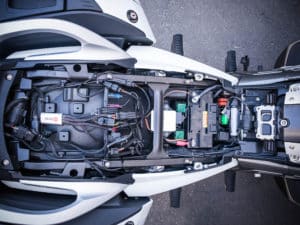
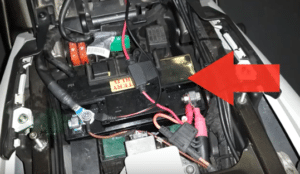
The DWA connector is located under the front edge of the top box rack/pillion grab handle (below).
Depending on whether your bike is equipped with DWA, the DWA connector will be seen in one of two configurations:
If your motorcycle has the factory BMW DWA system: The DWA connector will be plugged into the DWA module (a typical view is shown below).
If your motorcycle does not have the factory BMW DWA system: A resistor plug will be connected to the DWA connector.
Step 2: Locate the vehicle battery
The bike’s battery is located under the front seat (green icon, below).
Needed tools:
Step 1: Locate the DWA connector
Depending on whether your bike has DWA (the factory BMW anti-theft alarm system), the DWA connector will be seen in one of two configurations:
Step 2: Locate the vehicle battery
3. The battery is located in a recessed compartment above the engine airbox (above).
Step 3: Locate the horn
The factory horn is located between the front forks, under the lower triple clamp.
To reach the factory horn connector:
IMPORTANT: Do not connect the ezCAN’s CAN-bus connector to any part of the motorcycle other than the diagnostic connector. If you do, the ezCAN will not function.
In the case of BMW K1600 models, it is generally advisable to install the main body of the ezCAN under the pillion seat, forward of the DWA module.
Ensure that all ezCAN wiring is routed safely and securely, in a way that does not allow it to chafe or pinch. Where needed, secure all wiring to frame tubes or other components using the cable ties supplied with the ezCAN installation kit.
If your motorcycle has the factory BMW DWA system: The DWA connector will be plugged into the DWA module.
If your motorcycle does not have the factory BMW DWA system: A resistor plug will be connected to the DWA connector.
ezCAN cable routing may depend on a number of factors, including your personal preference.
Ensure that the wiring is routed safely and securely, in a way that does not allow it to chafe or pinch. Where needed, secure all wiring to frame tubes or other components using the cable ties supplied with the ezCAN installation kit.
WARNING: For safety reasons, always disconnect the negative battery terminal first, and re-connect it last.
Note: The HEX ezCAN’s status LED should be solid green for approximately a minute after connection to the battery. After this time, the ezCAN enters Sleep Mode, and there will be no LED activity until the bike’s ignition is switched ON.
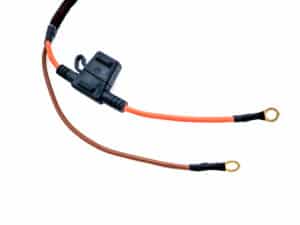
The ezCAN installation kit includes four two-wire stub connectors with male connection terminals, orange power wires and black ground wires.
The following parts are also included:
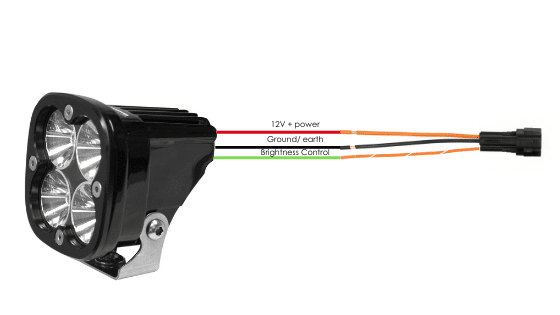
If the accessory to be connected to a power circuit has three wires, convert a two-wire stub connector to a three-wire connector as shown in the Connecting 3-wire LED lights section of the HEX ezCAN User Manual (downloadable from here).
If the accessory to be connected to a power circuit has two wires, seal the stub connector’s empty terminal cavity as shown in the Connecting 2-wire accessories section of the HEX ezCAN User Manual.
If any of the ezCAN’s power circuits will not be used, we recommend that you connect a blanking plug to the output plug of each unused circuit.
2-wire applications: insert a blanking seal.
3-wire applications: insert a PWM terminal wire.
Connect the male terminal of each stub connector to the relevant female ezCAN power circuit connector (below).
Connecting a 2-wire accessory to an ezCAN stub connector:
Connecting a 3-wire accessory to an ezCAN stub connector:
Connecting low-power smart accessories to a power circuit:
Read the Hex ezBUS and Configuring Hex ezBUS functionality sections of the ezCAN user manual (downloadable from here) for detailed information on how to use ezBUS functionality.
If you are installing ‘smart’ accessories (that is, low-power accessories capable of intelligent input and control through the ezCAN’s LIN bus), note the following:
IMPORTANT: If the stub connectors included in your ezCAN installation kit do not have orange power wires, but instead have colours that match the colouring of the ezCAN power circuits (as seen below), always connect like-to-like (red stub connector to red power circuit, blue stub connector to blue power circuit, and so on.)
The HEX ezCAN Extension Kit contains everything you need to connect front auxiliary lights, rear accessory lights and a horn to the ezCAN. It also includes additional connectors that allow you to connect other accessories.
WARNING: Test and check your installations and accessories in a safe, controlled environment before first use. Caution is advised at all times. Extra vigilance is needed when testing new features or accessories. You do so at your own risk.
DISCLAIMER: Hex Innovate is not liable for any injury or damage, howsoever caused, and all products and services are used at your own risk.
Before finalizing the ezCAN installation or re-installing any components you may have removed, it is important that you test all newly installed accessories for satisfactory fitment and correct operation.
Many ezCAN-powered accessories can be tested by switching the ignition ON and operating the relevant controls. Exceptions include:
Complete the ezCAN installation as follows:
You will now be redirected to our primary website to view our Privacy Policy
You will now be redirected to our primary website to view our Legal Information