Decide what and how many accessories you will be installing, and their requirements. Must some accessories be connected in a specific manner and/or to specific power circuits? As an example, low-powered ‘smart’ accessories must typically be installed on the ezBUS (White) power circuit.
Read the Installing for Life section of the HEX ezCAN User Manual (downloadable from here), and evaluate your planned installation according to the guidelines in that section.
Register your HEX ezCAN (All you need to do to register the ezCAN is connect it to your computer using the supplied USB cable, meaning you can do it at the comfort of your desk.)
The IMU (Inertial Measurement Unit) connector is located under the rear part of the fuel tank. Access the IMU connector as follows:
Remove the front and rear seats.
Use the 5mm Allen wrench to remove the four trim retaining screws (yellow arrows, below).
3. The plastic side trim panels below the front seat are held in place by plastic clips. Gently pull the upper edges of both side trim panels away from the bike’s frame (green arrows, below).
4. Use the 5mm Allen wrench to remove the two retaining screws (yellow arrows, above).
5. Use the 10mm wrench or socket to remove the fuel tank retaining screw (blue arrow, above).
6. Remove the two black plastic parts that were freed by removing the screws in the steps above (yellow arrows, above). The fuel tank mounting bracket will be exposed.
7. Use the 8mm wrench or socket to remove the four fuel tank mounting bracket retaining screws (white arrows, above).
8. Carefully lift the rear edge of the fuel tank.
9. Remove the fuel tank mounting bracket.
Step 2: Locate the battery
The battery is located on the left side of the motorcycle, under the tool compartment and above the starter motor.
Access the battery terminals as follows:
1. Use the 5mm Allen wrench to remove the two tool compartment retaining screws (yellow arrows, below).
2. Remove the tool compartment.
The battery terminals will be exposed.
Step 3: Plug the HEX ezCAN into the CAN-BUS
Step 3:
PLUG THE HEX ezCAN INTO THE CAN-BUS
IMPORTANT: Do not connect the HEX ezCAN’s CAN-bus connector to any part of the motorcycle other than the IMU connector. If you do, the ezCAN will not function.
1. Install the main body of the HEX ezCAN in the vicinity of the IMU connector. 2. Remove the female IMU connector from the bike’s IMU module. The IMU connector and module are located under the rear edge of the fuel tank, slightly forward of the rear fuel tank mounting point (green arrow, below).
3. Connect the male HEX ezCAN CAN-bus connector to the female IMU connector (green arrow, above). 4. Connect the female HEX ezCAN CAN-bus connector to the bike’s IMU module (green arrow, below).
Step 4: Connect the HEX ezCAN to the bike's battery
Step 4:
CONNECT THE HEX ezCAN TO THE BIKE'S BATTERY
Ensure that all wiring is routed safely and securely in a way that does not allow it to chafe or pinch. Where needed, secure all wiring to frame tubes or other components using the cable ties supplied with the HEX ezCAN installation kit.
WARNING: For safety reasons, always disconnect the negative battery terminal first, and re-connect it last.
1. Disconnect the negative wiring harness terminal from the negative battery pole. 2. Disconnect the positive wiring harness terminal from the positive battery pole. 3. Open the rubber lid of the HEX ezCAN’s main fuse housing, and temporarily remove the fuse. This will make it easier to route the ezCAN power cables and fuse housing through tight spaces. 4. Route both ezCAN power supply cables forward from the HEX ezCAN’s main body along the left side of the bike, under the fuel tank mounting bracket and toward the battery (broken green line, below).
5. Position the HEX ezCAN power supply cables in such a way that the fuse holder is located above the battery (green arrow, below). If the fuse holder is located on the visible side of the battery, it will prevent the tool compartment from fitting correctly.
6. Connect the terminal on the orange ezCAN power cable, and the bike’s positive wiring harness terminal, to the positive battery pole. 7. Connect the terminal on the brown ezCAN power cable, and the bike’s negative wiring harness terminal, to the negative battery pole. 8. Reinstall the HEX ezCAN’s main fuse into the fuse holder, and close the rubber lid of the fuse housing. 9. Tidy the CAN-bus and battery cable routing, making sure you have easy access to the four power circuit plugs. 10. Secure all loose cables using the cable ties included in the HEX ezCAN installation kit.
Note: The HEX ezCAN’s status LED should be solid green for approximately a minute after connection to the battery. After this time, the ezCAN enters Sleep Mode, and there will be no LED activity until the bike’s ignition is switched ON.
Step 5: Connect the accessories, using the colour coding
Step 5:
CONNECT THE ACCESSORIES, USING COLOUR CODING
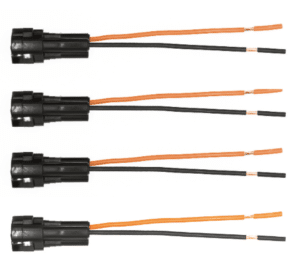
The HEX ezCAN installation kit includes four two-wire stub connectors with male connection terminals, orange power wires and black ground wires.
The following parts are also included:
4x pulse-width modulation (PWM) terminal wires (orange with white tracer)
4x rubber blanking seals
If the accessory to be connected to a power circuit has three wires, convert a two-wire stub connector to a three-wire connector as shown in the Connecting 3-wire LED lights section of the HEX ezCAN User Manual (downloadable from here).
If the accessory to be connected to a power circuit has two wires, seal the stub connector’s empty terminal cavity as shown in the Connecting 2-wire accessories section of the HEX ezCAN User Manual.
If any of the HEX ezCAN’s power circuits will not be used, we recommend that you connect a blanking plug to the output plug of each unused circuit.
2-wire applications: insert a blanking seal. 3-wire applications: insert a PWM terminal wire.
4x terminal wires and blanking seals
4x 2-wire stub connectors
Connect the male terminal of each stub connector to the relevant female HEX ezCAN power circuit connector (below).
Connecting a 2-wire accessory to a HEX ezCAN stub connector:
Connect the accessory’s ground/Earth wire (this is usually, but not always black or brown) to the ground wire of a HEX ezCAN stub connector.
Connect the accessory’s power wire (this is usually, but not always red) to the 12V power wire of a HEX ezCAN stub connector.
Connecting a 3-wire accessory to a HEX ezCAN stub connector:
Connect the accessory’s ground/Earth wire and power wire as described above.
Connect the accessory’s PWM control wire to the dual-colour (solid colour+tracer) wire of a HEX ezCAN stub connector.
Connecting low-power smart accessories to a power circuit:
If you are installing ‘smart’ accessories (that is, low-power accessories capable of intelligent input and control through the HEX ezCAN’s LIN bus), note the following:
Smart accessories (including the HEX ezSWITCH) must only be connected to the HEX ezCAN’s ezBUS (white) power circuit. Smart accessories will not work if connected to the red, yellow or blue circuits.
The ezBUS (white) power circuit can accommodate any number of individual accessories, to a maximum of fifteen.
A selection of HEX ezBUS adaptors and connectors is available, allowing you to connect smart accessories quickly and easily. See the ezBUS Accessories section of the HEX Innovate online store for details.
Read the HEX ezBUS and Configuring HEX ezBUS functionality sections of the HEX ezCAN user manual (downloadable from here) for detailed information on how to use ezBUS functionality.
Note that if the white circuit is set to ezBUS mode, its fuse trip limit is set to 15 Amps by default. If needed, ezBUS PWR functionality can be used to increase the white circuit’s current capacity to a maximum of 30 Amps in ezBUS mode. See the relevant section of the HEX ezCAN User Manual for details.
IMPORTANT: If the accessory stub connectors included in your HEX ezCAN installation kit do not have orange power wires, but instead have colours that match the colouring of the ezCAN power circuits (as seen below), always connect like-to-like (red stub connector to red power circuit, blue stub connector to blue power circuit, and so on.)
EASIER INSTALLATION WITH THE HEX ezCAN EXTENSION KIT
The HEX ezCAN Extension Kit contains everything you need to connect front auxiliary lights, rear accessory lights and a horn to the HEX ezCAN. It also includes additional connectors that allow you to connect other accessories.
2x 1.5m 3-core extension cables (typically used for 2-wire or 3-wire front auxiliary lights)
1x 0.5m 3-core extension cable (typically used for a rear running/brake light)
1x 1.5m 2-core extension cable, with spade connectors (typically used to connect air horns or other 2-wire accessories)
3x female MT-3 connectors, including terminal pins and terminal seals
5x male MT-3 connector kit, including terminal pins and terminal seals
5x rubber blanking seals (used in cases where only two terminals are used in a 3-wire MT-3 connector)
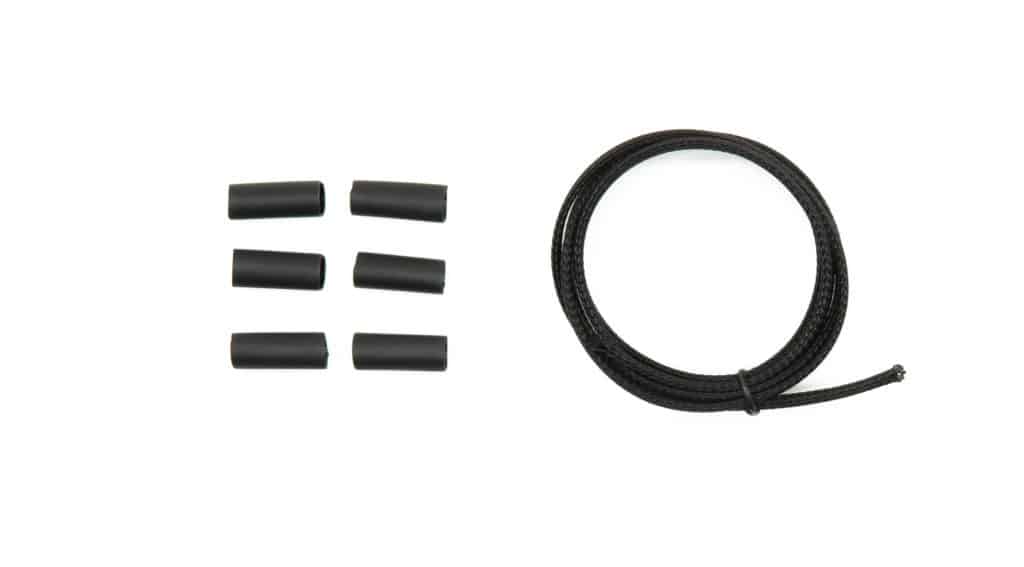
6x 20mm sections of adhesive-lined heat-shrink tubing
2x 6.3mm female spade connector terminals
1m cable sheathing
Front auxiliary lights extensions
Horn extension
Adhesive lined heat shrink & 1m sheathing
Brake/Accessory extension
Step 6: Test the installation
Step 6:
TEST THE INSTALLATION
WARNING: Test and check your installations and accessories in a safe, controlled environment before first use. Caution is advised at all times. Extra vigilance is needed when testing new features or accessories. You do so at your own risk.
DISCLAIMER: HEX Innovate is not liable for any injury or damage, howsoever caused, and all products and services are used at your own risk.
Before finalizing the HEX ezCAN installation or re-installing any components you may have removed, it is important that you test all newly installed accessories for satisfactory fitment and correct operation.
Many HEX ezCAN-powered accessories can be tested by switching the ignition ON and operating the relevant controls. Exceptions include:
Accessories for which you have enabled the Only on when engine running feature (examples may include Aux 1 lights, Aux 2 lights, MotoLights, and heated clothing). To test these functions, the bike’s engine must be running.
Some brake light functions require that the bike be moving at or above a certain speed. As examples, Flash on Emergency Stop and Flash on Rapid Engine Braking functions require deceleration of more than 21 Kilometres per hour per second.
Step 7: Complete the installation
Step 7:
COMPLETE THE INSTALLATION
Complete the HEX ezCAN installation as follows:
Make sure the main body of the HEX ezCAN is well-secured in a place where it is protected from pressure, heat and impact.
Make sure all factory, ezCAN and accessory cables and wiring harnesses are well clear of all moving parts, and securely fastened. Where needed, use the cable ties included in the HEX ezCAN installation kit.
Replace all motorcycle components and fasteners that may have been removed to facilitate the HEX ezCAN installation.
Inspect the complete installation for mistakes or problems, and fix all problems that you have noted.
Test all new accessories for correct operation a second time.
Keep the manual in a safe place on your computer, tablet or phone: it contains all the information you need to operate the HEX ezCAN and adjust its functionality.
Please note !
You will now be redirected to our primary website to view our Privacy Policy
We use cookies to ensure that we give you the best experience on our website. If you continue to use this site we will assume that you are happy with it.