HEX ezCAN-Unterstützungsstatus für Norden 901-Modelle
Der Norden 901 basiert auf der elektronischen Plattform der KTM 890 und unterliegt denselben Einschränkungen hinsichtlich der HEX ezCAN-Funktionalität:
Die Zusatzbremsleuchten werden nur bei Betätigung der Vorderradbremse aktiviert.
Die vorderen Zusatzscheinwerfer können nicht über die am Lenker des Fahrrads angebrachten Bedienelemente ein- und ausgeschaltet werden. Informationen zu Workarounds und Optionen zur Steuerung der Zusatzscheinwerfer-Hardware finden Sie imAbschnitt „Bedienung der vorderen Zusatzscheinwerfer“im HEX ezCAN-Benutzerhandbuch.Laden Sie das Handbuch von dieser Seite herunter.
Die HEX ezCAN-Funktionalität, die von den Blinkern abhängt, ist nicht verfügbar.
Die HEX ezCAN-Funktion, die bei Aktivierung des Blinkers die zusätzlichen Frontscheinwerfer ausschaltet oder blinken lässt, ist nicht verfügbar.
Die Unterstützung für die Funktionen „Fahren/Bremsen/Blinker“ ist nicht verfügbar.
Die HEX ezCAN-Funktionalität, die von der Unterscheidung zwischen Tages- und Nachthelligkeit abhängt (z. B. die Modulation der vorderen Zusatzbeleuchtung), ist nicht verfügbar.
Schritt 1: Software herunterladen, installieren und konfigurieren
Schritt 1
Software herunterladen, installieren und konfigurieren
Dies ist ein guter Zeitpunkt, um:
Packen Sie den HEX ezCAN aus.
Entscheiden Sie, welche und wie viele Zubehörteile Sie installieren möchten und welche Anforderungen diese haben. Müssen bestimmte Zubehörteile auf eine bestimmte Art und Weise und/oder an bestimmte Stromkreise angeschlossen werden? Beispielsweise müssen „intelligente” Zubehörteile mit geringem Stromverbrauch in der Regel an den ezBUS-Stromkreis (weiß) angeschlossen werden.
Lesen Sie den Abschnitt „Installation für den lebenslangen Gebrauch“ im HEX ezCAN-Benutzerhandbuch (hier herunterladbar) und bewerten Sie Ihre geplante Installation gemäß den Richtlinien in diesem Abschnitt.
Registrieren Sie Ihren HEX ezCAN (Um den ezCAN zu registrieren, müssen Sie ihn lediglich mit dem mitgelieferten USB-Kabel an Ihren Computer anschließen, sodass Sie dies bequem von Ihrem Schreibtisch aus erledigen können.)
Schritt 2: Suchen Sie den Diagnosestecker und die Batterie.
Schritt 2
Suchen Sie den Diagnosestecker und die Batterie.
Um Zugang zum Diagnosestecker und zur Batterie zu erhalten:
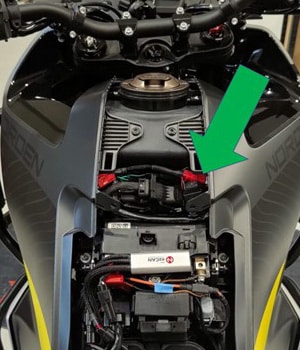
1. Entfernen Sie den Sitz. Die Batterieabdeckung wird freigelegt (grüner Pfeil, unten).
2. Entfernen Sie die Batterieabdeckung, indem Sie die Abdeckung vom Kraftstofftank wegziehen (unten).
Der Euro-5-Diagnosestecker, der bei den Modellen Husqvarna Norden 901 verwendet wird, sieht wie folgt aus:
Schritt 3: Schließen Sie den HEX ezCAN an den CAN-BUS des Fahrrads an.
Schritt 3
Stecken Sie den HEX ezCAN in den CAN-BUS des Fahrrads.
WICHTIG:Schließen Sieden CAN-Bus-Stecker des HEX ezCAN nicht an andere Teile des Motorrads als den Diagnosestecker an. Andernfalls funktioniert der ezCAN nicht.
Installieren Sie das Hauptgerät des HEX ezCAN in der Nähe des Diagnosesteckers des Motorrads. In dem hier gezeigten Beispiel wurde das Hauptgerät über der Batterie unter der Batterieabdeckung installiert.
Entfernen Sie die Schutzkappe vom Diagnosestecker des Fahrrads (grüner Pfeil, erstes Bild).
Ein JWPF-zu-Euro-5-Diagnose-Splitterkabel ist im HEX ezCAN Scandes-Installationskit enthalten. Stecken Sie den weiblichen JWPF-Stecker (weiß) des Splitterkabels in den männlichen JWPF-Stecker des HEX ezCAN.
Verbinden Sie den Euro 5-Stecker des Splitterkabels mit dem Diagnosestecker des Motorrads.
Drücken Sie die Schutzkappe, die vom Diagnosestecker des Motorrads entfernt wurde, auf die Euro-5-Buchse des Splitterkabels.
Der Euro 5-Stecker des Splitterkabels sorgt dafür, dass ein Diagnosestecker für die Fehlersuche zur Verfügung steht, ohne dass der HEX ezCAN vom Motorrad abgezogen werden muss.
Schritt 4: Verbinden Sie den HEX ezCAN mit der Batterie des Fahrrads.
Schritt 4
HEX ezCAN an die Batterie des Fahrrads anschließen
Die Verlegung des HEX ezCAN-Kabels kann von einer Reihe von Faktoren abhängen, darunter auch von Ihren persönlichen Vorlieben.
Stellen Sie sicher, dass die Verkabelung sicher und geschützt verlegt ist, sodass sie nicht scheuern oder eingeklemmt werden kann. Befestigen Sie alle Kabel bei Bedarf mit den im HEX ezCAN-Installationskit enthaltenen Kabelbindern an Rahmenrohren oder anderen Komponenten.
WARNUNG:Aus Sicherheitsgründen immer zuerst den Minuspol der Batterie abklemmen und zuletzt wieder anschließen.
Beginnen Sie die Installation, indem Sie den Hauptteil des HEX ezCAN an einem Ort platzieren, der eine einfache und logische Verkabelung ermöglicht. Wir empfehlen, den Hauptteil des HEX ezCAN unter einem Sitz in der Nähe des Diagnosesteckers zu installieren, da dies den Zugriff für Firmware-Updates und Diagnosen erleichtert.
Trennen Sie den Minuskabelbaumanschluss vom Minuspol der Batterie.
Trennen Sie den Pluspol des Kabelbaums vom Pluspol der Batterie.
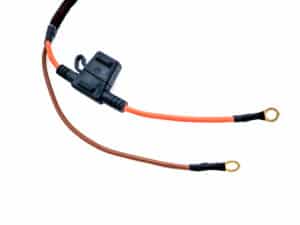
Verlegen Sie die Stromversorgungskabel des HEX ezCAN zur Batterie.
Verbinden Sie den Anschluss des orangefarbenen ezCAN-Stromkabels und den Pluspol-Anschluss des Kabelbaums des Motorrads mit dem Pluspol der Batterie.
Verbinden Sie den Anschluss des braunen ezCAN-Stromkabels und den Minuspol des Kabelbaums des Motorrads mit dem Minuspol der Batterie.
Ordnen Sie die Verlegung des CAN-Bus- und Batteriekabels. Befestigen Sie alle losen Kabel mit den im HEX ezCAN-Installationskit enthaltenen Kabelbindern und achten Sie darauf, dass Sie leichten Zugang zu den vier Steckern des Stromkreises haben.
Hinweis: Die Status-LED des HEX ezCAN sollte nach dem Anschließen an die Batterie etwa eine Minute lang durchgehend grün leuchten. Nach dieser Zeit wechselt der ezCAN in den Schlafmodus, und die LED leuchtet erst wieder, wenn die Zündung des Motorrads eingeschaltet wird.
HEX ezCAN Stromversorgungskabel
Schritt 5: Verbinden Sie das grüne Horn-Auslösekabel (optional).
Schritt 5
Schließen Sie das grüne Horn-Auslösekabel an (optional).
Der CAN-Bus der Husqvarna Norden 901-Modelle verfügt nicht über ein Signal zum Auslösen der Hupe. Um eine Zusatzhupe beim Drücken der Hupentaste aktivieren zu können, ist ein separater Hupenauslöseeingang zum HEX ezCAN vorhanden (rotes Kabel mit schwarzem Buchsenstecker, siehe unten).
WICHTIG: Auchwenn Sie keine Zusatzhupe an einem Norden 901 installieren möchten, muss das im HEX ezCAN-Installationskit enthaltene grüne Hupentriggerkabel installiert werden, wenn Sie die vorderen Zusatzscheinwerfer so konfigurieren möchten, dass sie bei Betätigung der Hupe blinken.
Zubehör-Hupentriggerung aktivieren
Entfernen Sie die Verkleidungen auf der linken und rechten Seite des Kraftstofftanks.
Suchen Sie die werkseitige Hupe an Ihrem Fahrrad.
Die werkseitige Hupe verfügt über zwei Stecker mit Flachsteckern, und der Kabelbaum des Motorrads ist über zwei separate Buchsen mit Flachsteckern mit der Hupe verbunden. Die Farben der werkseitigen Hupenkabel sindgrau und gelb mit blauer Markierung.
4. Verbinden Sie den einpoligen Stecker am grünen Horn-Auslösekabel mit der einpoligen Buchse mit grünem Kabel, die vom Hauptteil des HEX ezCAN (oben) ausgeht.
6. Verbinden Sie den Stecker- und Buchsenflachstecker des Horn-Auslösers mit dem freiliegenden Stecker am Horn (oben).
5. Entfernen Sie die Flachsteckersicherung mit dem grauen Kabelvon der werkseitigen Hupe (oben).
7. Verbinden Sie die werkseitige Flachsteckhülse mit dem grauen Kabelmit dem freiliegenden Stecker am Horn-Auslösekabel (oben).
Installation des Horn-Auslösekabels abschließen
Wenn Sie eine Zusatzhupe installieren möchten, schließen Sie diese an einen zweipoligen HEX ezCAN-Stub-Stecker an (siehe Schritt 7). Der Stub-Stecker wird an einen ezCAN-Stromkreis Ihrer Wahl angeschlossen.
Wenn die werkseitige Hupe und/oder die Zusatzhupe beim Drücken des Hupknopfs am Motorrad nicht funktionieren, siehe„Hupanschluss prüfen“ weiter unten.
Testen der Hornverbindung
Wenn die werkseitige Hupe und/oder die Zusatzhupe beim Drücken des Hupknopfs am Motorrad nicht funktionieren, überprüfen Sie den Hupenstromkreis anhand der folgenden Schritte:
1. Verbinden Sie den HEX ezCAN mit Ihrem Computer. 2. Starten Sie die HEX ezCAN-Konfigurationssoftware. 3. Schalten Sie die Zündung des Motorrads ein. 4. Klicken Sie auf das Hamburger-Symbol in der oberen rechten Ecke des HEX ezCAN-Konfigurationstools (roter Pfeil, unten) und dann auf „Diagnostics“ (Diagnose).
Das Diagnosefenster wird angezeigt.
5. Lesen Sie den Wertfür die Hupeneingangsspannungab (roter Pfeil, unten). Wenn das Hupentriggerkabel des HEX ezCAN das richtige (schwarze) werkseitige Hupenkabel ersetzt hat:
Der Wert sollte bei oder nahe 0 V liegen, wenn die Hupe inaktiv ist.
Der Wert sollte bei aktivierter Hupe etwa 12 Vbetragen.
Schritt 6: Verbinden Sie das blaue Fernlicht-Auslösekabel (optional).
Schritt 6
Verbinden Sie das blaue Fernlicht-Auslösekabel (optional).
Der CAN-Bus der Husqvarna Norden 901-Modelle verfügt nicht über ein Fernlicht-Auslösesignal. Um die Helligkeit der zusätzlichen Frontscheinwerfer erhöhen oder verringern zu können, wenn der Fernlichtschalter auf Fernlicht gestellt ist oder die Blinklichttaste betätigt wird, ist ein separater Fernlicht-Auslöseeingang zum HEX ezCAN vorhanden (rotes Kabel mit schwarzem Stecker, rechts).
Die Installation des Fernlicht-Auslösekabels ist nur erforderlich, wenn Sie die Helligkeit der zusätzlichen Frontscheinwerfer erhöhen oder verringern möchten, wenn der Fernlichtschalter auf Fernlicht gestellt ist.
Aktivieren der Fernlichtauslösung
Entfernen Sie die vier Schrauben, mit denen die Frontscheibe des Motorrads befestigt ist, und nehmen Sie die Scheibe ab.
Entfernen Sie die drei Schrauben, mit denen der Scheinwerfer des Fahrrads befestigt ist.
Ziehen Sie den Stecker des Kabelbaums für den Scheinwerfer (grüner Pfeil) ab.
Entfernen Sie den Scheinwerfer.
Entfernen Sie die Verkleidung auf der linken Seite des Kraftstofftanks.
Verbinden Sie den 3-poligen MT-Stecker des Fernlicht-Auslösers mit dem MT-Stecker der Scheinwerferverkabelung (grüner Pfeil oben, siehe unten) des Motorrads.
Verbinden Sie den 3-poligen MT-Stecker (Buchse) des Fernlicht-Auslösers mit dem MT-Stecker (Stecker) des Scheinwerfers (unten links, grüner Pfeil, oben).
Führen Sie das freie Ende des blauen Auslösekabels mit Einpolstecker durch die obere linke Öffnung an der Scheinwerferverkleidung (grüner Pfeil, unten).
Verlegen Sie das blaue Auslöserkabel vom Loch in der Scheinwerferverkleidung nach unten und dann entlang des Kabelbaums des Motorrads nach hinten (unten).
Verlegen Sie das blaue Auslöserkabel unter der linken Seite des Kraftstofftanks in Richtung der Oberseite der Batterie (unten).
Verbinden Sie den einpoligen Stecker am blauen Auslösekabel mit der einpoligen Buchse am roten Kabel, das vom Hauptteil des HEX ezCAN (unten) ausgeht.
Nehmen Sie die gesamte unnötige Lose entlang des blauen Auslösekabels auf und stellen Sie sicher, dass das Kabel sicher verstaut ist und nicht beschädigt oder abgerieben werden kann.
Schritt 7: Schließen Sie das Zubehör anhand der Farbcodierung an.
Schritt 7
Schließen Sie das Zubehör unter Verwendung der Farbcodierung an.
Das HEX ezCAN-Installationskit enthält vier zweipolige Stutzenverbinder mit Steckanschlüssen, orangefarbene Stromkabel und schwarze Erdungskabel.
Die folgenden Teile sind ebenfalls enthalten:
4x Pulsweitenmodulations-Anschlusskabel (PWM) (orange mit weißer Markierung)
4x Gummi-Blindverschlüsse
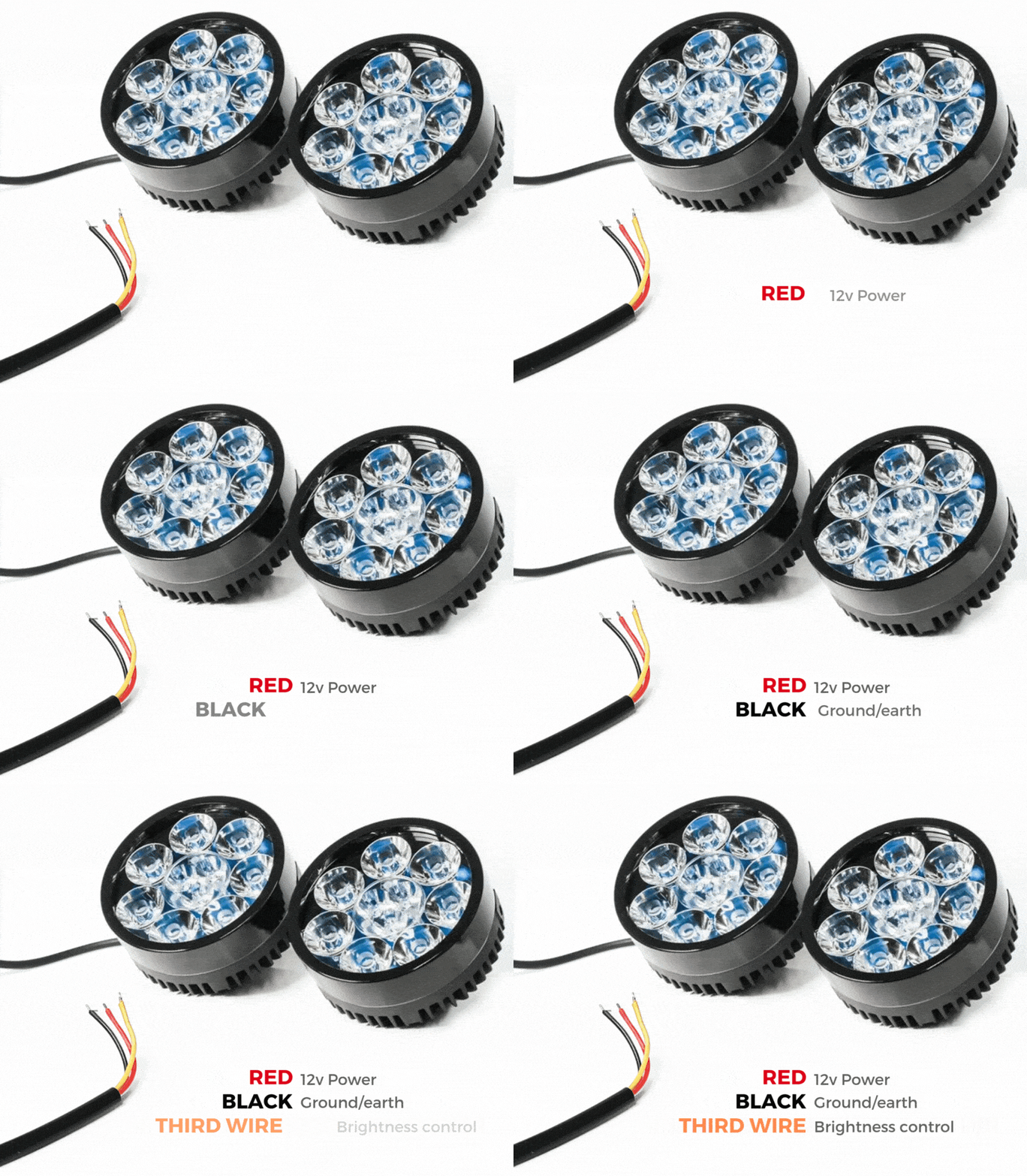
Wenn das an einen Stromkreis anzuschließende Zubehörteil drei Drähte hat, wandeln Sie einen zweipoligen Stub-Stecker in einen dreipoligen Stecker um, wie im Abschnitt „Anschließen von 3-poligen LED-Leuchten“ des HEX ezCAN-Benutzerhandbuchs (hier herunterladbar) beschrieben.
Wenn das an einen Stromkreis anzuschließende Zubehörteil zwei Drähte hat, verschließen Sie den leeren Anschlussraum des Stub-Steckers wie im Abschnitt „Anschließen von 2-adrigem Zubehör“ im HEX ezCAN-Benutzerhandbuch beschrieben.
Wenn einer der Stromkreise des HEX ezCAN nicht verwendet wird, empfehlen wir, einen Blindstecker an den Ausgangsstecker jedes ungenutzten Stromkreises anzuschließen.
Verbinden Sie den Stecker jedes Stub-Steckverbinders mit dem entsprechenden HEX ezCAN-Stromkreis-Anschluss (unten).
Anschluss eines 2-adrigen Zubehörs an einen HEX ezCAN-Stub-Stecker:
Verbinden Sie das Erdungskabel des Zubehörs (dies ist in der Regel, aber nicht immer schwarz oder braun) mit dem Erdungskabel eines HEX ezCAN-Stub-Steckverbinders.
Verbinden Sie das Stromkabel des Zubehörs (dies ist in der Regel, aber nicht immer, rot) mit dem 12-V-Stromkabel eines HEX ezCAN-Stub-Steckverbinders.
Anschluss eines 3-adrigen Zubehörs an einen HEX ezCAN-Stub-Stecker:
Schließen Sie das Erdungskabel und das Stromkabel des Zubehörs wie oben beschrieben an.
Verbinden Sie das PWM-Steuerkabel des Zubehörs mit dem zweifarbigen Kabel (einfarbig + Tracer) eines ezCAN-Stub-Steckverbinders.
Anschluss von Smart-Zubehör mit geringem Stromverbrauch an einen HEX ezCAN-Stub-Anschluss:
Lesen Sie die Abschnitte „HEX ezBUS“ und „Konfigurieren der HEX ezBUS-Funktionalität“ im HEX ezCAN-Benutzerhandbuch (hier herunterladbar), um detaillierte Informationen zur Verwendung der ezBUS-Funktionalität zu erhalten.
Wenn Sie „intelligentes“ Zubehör installieren (d. h. Zubehör mit geringem Stromverbrauch, das über den LIN-Bus des HEX ezCAN intelligente Eingaben und Steuerungen ermöglicht), beachten Sie Folgendes:
Intelligente Zubehörteile (einschließlich des HEX ezSWITCH) dürfen nur an den Stromkreis ezBUS (weiß) des HEX ezCAN angeschlossen werden. Intelligente Zubehörteile funktionieren nicht, wenn sie an den roten, gelben oder blauen Stromkreisen angeschlossen werden.
Der Stromkreis des ezBUS (weiß) kann eine beliebige ungerade oder gerade Anzahl einzelner Zubehörteile aufnehmen, maximal jedoch fünfzehn.
Es steht eine Auswahl an HEX ezBUS-Adaptern und -Anschlüssen zur Verfügung, mit denen Sie intelligentes Zubehör schnell und einfach anschließen können. Weitere Informationen finden Sie im Abschnitt „ezBUS-Zubehör“ des HEX Innovate Online-Shops.
Lesen Sie die Abschnitte „HEX ezBUS“ und „Konfigurieren der HEX ezBUS-Funktionalität“ im HEX ezCAN-Benutzerhandbuch (hier herunterladbar), um detaillierte Informationen zur Verwendung der ezBUS-Funktionalität zu erhalten.
Beachten Sie, dass bei Einstellung des weißen Stromkreises auf den ezBUS-Modus dessen Sicherungsauslösegrenze standardmäßig auf 15 Ampere festgelegt ist. Bei Bedarf kann die ezBUS PWR-Funktion verwendet werden, um die Stromkapazität des weißen Stromkreises im ezBUS-Modus auf maximal 30 Ampere zu erhöhen. Weitere Informationen finden Sie im entsprechenden Abschnitt des HEX ezCAN-Benutzerhandbuchs.
WICHTIG: Wenn die in Ihrem HEX ezCAN-Installationskit enthaltenen Stub-Stecker keine orangefarbenen Stromkabel haben, sondern stattdessen Farben, die mit der Farbgebung der HEX ezCAN-Stromkreise übereinstimmen (siehe unten), verbinden Sie immer gleichfarbige Stecker miteinander (roter Stub-Stecker mit rotem Stromkreis, blauer Stub-Stecker mit blauem Stromkreis usw.).
Einfachere Installation mit dem HEX ezCAN-Erweiterungskit
Das HEX ezCAN-Erweiterungskit enthält alles, was Sie benötigen, um vordere Zusatzscheinwerfer, hintere Zusatzleuchten und eine Hupe an das HEX ezCAN anzuschließen. Es enthält außerdem zusätzliche Steckverbinder, mit denen Sie weiteres Zubehör anschließen können.
2x 1,5 m 3-adrige Verlängerungskabel (typischerweise für 2-adrige oder 3-adrige Frontzusatzscheinwerfer verwendet)
1x 0,5 m 3-adriges Verlängerungskabel (typischerweise für ein Rücklicht/Bremslicht verwendet)
1x 1,5 m langes 2-adriges Verlängerungskabel mit Flachsteckern (wird in der Regel zum Anschluss von Druckluft-Signalhupen oder anderem 2-adrigem Zubehör verwendet)
3x weibliche MT-3-Stecker, einschließlich Anschlussstiften und Anschlussdichtungen
5x MT-3-Steckverbinder-Set, einschließlich Anschlussstiften und Anschlussdichtungen
5x Gummi-Blindverschlüsse (werden verwendet, wenn nur zwei Anschlüsse in einem 3-poligen MT-3-Stecker verwendet werden)
6 x 20 mm Abschnitte von Schrumpfschlauch mit Klebeeinlage
2x 6,3-mm-Flachsteckhülsenanschlüsse
1 m Kabelummantelung
Schrumpfschlauch mit Kleberückseite und 1 m Ummantelung
Verlängerungen für Frontzusatzscheinwerfer
Hornverlängerung
Brems-/Zubehörverlängerung
Schritt 8: Testen Sie die Installation
Schritt 8
Testen Sie die Installation
WARNUNG: Testen und überprüfen Sie Ihre Installationen und Zubehörteile vor dem ersten Gebrauch in einer sicheren, kontrollierten Umgebung. Seien Sie stets vorsichtig. Bei der Erprobung neuer Funktionen oder Zubehörteile ist besondere Vorsicht geboten. Sie tun dies auf eigene Gefahr.
HAFTUNGSAUSSCHLUSS: HEX Innovate haftet nicht für Verletzungen oder Schäden, unabhängig von deren Ursache, und alle Produkte und Dienstleistungen werden auf eigene Gefahr genutzt.
Bevor Sie die Installation des HEX ezCAN abschließen oder eventuell entfernte Komponenten wieder einbauen, sollten Sie unbedingt alle neu installierten Zubehörteile auf korrekten Sitz und einwandfreie Funktion prüfen.
Viele mit HEX ezCAN betriebene Zubehörteile können getestet werden, indem die Zündung eingeschaltet und die entsprechenden Bedienelemente betätigt werden. Ausnahmen sind:
Zubehör, für das Sie die Funktion „Nur bei laufendem Motor“ aktiviert haben (Beispiele hierfür sind Aux 1-Leuchten, Aux 2-Leuchten, MotoLights und beheizbare Kleidung). Um diese Funktionen zu testen, muss der Motor des Motorrads laufen.
Einige Bremslichtfunktionen erfordern, dass das Motorrad eine bestimmte Geschwindigkeit erreicht oder überschreitet. Beispielsweise erfordern die Funktionen „Blinken bei Notbremsung” und „Blinken bei schneller Motorbremsung” eine Verzögerung von mehr als 21 Kilometern pro Stunde pro Sekunde.
Schritt 9: Installation abschließen
Schritt 9
Installation abschließen
Führen Sie die Installation von HEX ezCAN wie folgt durch:
Stellen Sie sicher, dass das Hauptgerät des HEX ezCAN an einem Ort sicher befestigt ist, an dem es vor Druck, Hitze und Stößen geschützt ist.
Stellen Sie sicher, dass alle Werks-, ezCAN- und Zubehörkabel sowie Kabelbäume ausreichend Abstand zu allen beweglichen Teilen haben und sicher befestigt sind. Verwenden Sie bei Bedarf die im HEX ezCAN-Installationskit enthaltenen Kabelbinder.
Ersetzen Sie alle Motorradkomponenten und Befestigungselemente, die möglicherweise entfernt wurden, um die Installation von ezCAN zu erleichtern.
Überprüfen Sie die gesamte Installation auf Fehler oder Probleme und beheben Sie alle festgestellten Probleme.
Testen Sie alle neuen Zubehörteile ein zweites Mal auf korrekte Funktion.
Wenn Sie dies noch nicht getan haben, laden Sie das HEX ezCAN-Benutzerhandbuch von dieser Seite herunter. Bewahren Sie das Handbuch an einem sicheren Ort auf Ihrem Computer, Tablet oder Smartphone auf: Es enthält alle Informationen, die Sie für die Bedienung des HEX ezCAN und die Anpassung seiner Funktionen benötigen.
Bitte beachten Sie!
Sie werden nun zu unserer Hauptwebsite weitergeleitet, um unsere Datenschutzerklärung einzusehen.
Wir verwenden Cookies, um Ihnen die bestmögliche Erfahrung auf unserer Website zu bieten. Wenn Sie diese Website weiterhin nutzen, gehen wir davon aus, dass Sie damit einverstanden sind.