
This is a step-by-step guide to installing the HEX ezCAN Everest for CFMOTO.
IMPORTANT: This installation guide is only applicable to the CFMOTO motorcycle models listed below.
If you are purchasing a HEX ezCAN for, or installing a HEX ezCAN on a CFMOTO that is not in the model list below, refer to the ‘Which HEX ezCAN?’ page to see if this acceesry manager supports your CFMOTO. If not, the HEX ezCAN PURE Universal Accessory Manager supports pretty much any 12V motorcycle, including models that do not have a CAN-bus system.
Les vélos suivants sont pris en charge :
See Partial Support details below
Due to the wiring harness limitations of CFMOTO 800 MT-X and 1000MT-X models, these models have the following functionality restrictions.
* 800MT-X / [US model] IBEX 950 (2026+):
Automatic auxiliary light dimming based on ambient day/night conditions is not supported on the 800MT-X, as the bike lacks a built-in ambient light sensor.
** 1000MT-X / [US model] IBEX 800E (2025+):
The CFMOTO 1000MT-X is fitted with an original equipment (OE) ambient light sensor. To enable the auxiliary lights’ variable intensity settings designed for this model, ensure the display is set to ‘Auto’ rather than ‘Day’ or ‘Night’. If fixed to either mode, the auxiliary lights will not automatically adjust to changing light conditions.
Using the HEX ezCAN Accessory Manager, you can link your heated gear directly to the power level of your heated grips. This allows the heat output of any connected clothing to adjust seamlessly in sync with your bike’s heated grip settings.
Before you begin the physical installation, complete these quick preparation steps:
Access the vehicle battery and OBD-II connector as follows:


Connecting to the CAN-bus:


The best location for the main body of the HEX ezCAN device is underneath the rider seat attachment brace, tucked towards the right hand side, of the battery cover. This way the device is protected, and you still have access to the device.
When planning your accessory cables, ensure that the wiring is routed safely and securely, in a way that does not allow it to chafe or pinch. Where needed, secure all wiring to frame tubes or other components using the cable ties supplied with the HEX ezCAN installation kit.
AVERTISSEMENT : pour des raisons de sécurité, débranchez toujours la borne négative de la batterie en premier et rebranchez-la en dernier.
Remarque : le voyant d'état du HEX ezCAN doit rester vert fixe pendant environ une minute après la connexion à la batterie. Passé ce délai, le HEX ezCAN passe en mode veille et le voyant reste éteint jusqu'à ce que le contact du vélo soit mis.
Connectez le HEX ezCAN à la borne positive de la batterie, puis à la borne négative.
Rangez et fixez les câbles. Assurez-vous d'avoir facilement accès aux quatre fiches du circuit d'alimentation.

In between the CAN-bus connector and the HEX ezCAN Everest, you will find the horn tigger wire connector (black connector from a green wire). Before you attach the Horn Trigger Wire, locate the CFMOTO OE horn at the front of the bike, near or just underneath the radiator.
À titre d'illustration, les images ci-dessous montrent un fil d'alimentation noir. Veuillez noter que le fil d'alimentation identifié sur votre moto peut être d'une couleur différente.
Une fois que vous avez identifié la borne d'alimentation correcte pour le klaxon, connectez le répartiteur de klaxon comme suit :


Le kit d'installation HEX ezCAN comprend quatre connecteurs à deux fils avec bornes de connexion mâles, des fils d'alimentation orange et des fils de terre noirs.
Les pièces suivantes sont également incluses :
If the accessory to be connected to a power circuit has three wires, convert a two-wire stub connector to a three-wire connector as shown in the Connecting 3-wire LED lights section of the HEX ezCAN User Manual (downloadable from here).
Si l'accessoire à connecter à un circuit d'alimentation comporte deux fils, scellez la cavité vide du connecteur comme indiqué dans la section « Connexion d'accessoires à 2 fils » du manuel d'utilisation HEX ezCAN.
Si l'un des circuits d'alimentation du HEX ezCAN n'est pas utilisé, nous vous recommandons de brancher un bouchon d'obturation sur la prise de sortie de chaque circuit inutilisé.


Connectez la borne mâle de chaque connecteur court au connecteur femelle HEX ezCAN correspondant du circuit d'alimentation (ci-dessous).

Connexion d'un accessoire à 2 fils à un connecteur stub HEX ezCAN :
Connexion d'un accessoire à 3 fils à un connecteur stub HEX ezCAN :
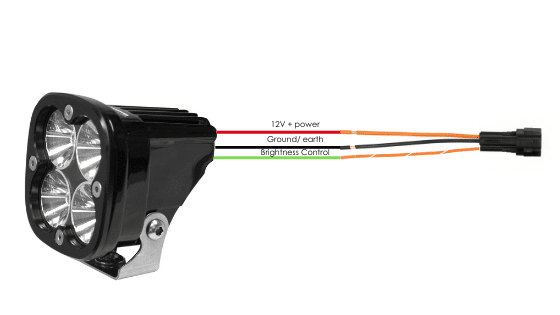
Connecting ‘smart’ Certified ezBUS-Ready accessories to a HEX ezCAN stub connector:
Pour plus d'informations sur l'utilisation de la fonctionnalité ezBUS, consultez les sections « HEX ezBUS » et « Configuration de la fonctionnalité HEX ezBUS » du manuel d'utilisation HEX ezCAN (téléchargeable ici).
If you are installing ‘smart’ Certified ezBUS-Ready accessories (that is, accessories capable of intelligent input and control through the HEX ezCAN’s LIN bus), note the following:
Pour plus d'informations sur l'utilisation de la fonctionnalité ezBUS, consultez les sections « HEX ezBUS » et « Configuration de la fonctionnalité HEX ezBUS » du manuel d'utilisation HEX ezCAN (téléchargeable ici).
Note that if the white circuit is set to ezBUS mode, its fuse trip limit is set to 15 Amps by default. If needed, ezBUS PWR functionality can be used to increase the white circuit’s current capacity to a suggested maximum of 25 Amps in ezBUS mode. See the relevant section of the HEX ezCAN User Manual for details.
IMPORTANT :
The four output circuits on your ezCAN are colour-coded. When you plug in an accessory—like auxiliary lights, a horn, or a brake light—just take note of the wire colour for that specific circuit.
When you open the HEX ezCAN software, you’ll see those exact same colours listed under the Circuit Functions section. Simply match the software configuration to the wire colour you connected your accessory to, and you’re good to go!
Plug it in: Connect your accessory to a colour-coded circuit output.
Match it up: Open the ezCAN software and select the matching colour to assign its function.


Whether you’re fitting front spot lights, a extra rear brake light, a loud air horn, or your favourite heated kit, HEX ezCAN has you covered.
We offer a complete range of cables, adaptors, splitters, and connectors to help you wire up virtually any combination of electronic gear to your ezCAN—plus plenty of spare connectors to keep in your toolkit for future builds.
Click the links below to explore the full range of accessories:
AVERTISSEMENT : Testez et vérifiez vos installations et accessoires dans un environnement sûr et contrôlé avant la première utilisation. La prudence est de mise à tout moment. Une vigilance accrue est nécessaire lors du test de nouvelles fonctionnalités ou de nouveaux accessoires. Vous le faites à vos propres risques.
AVERTISSEMENT : HEX Innovate n'est pas responsable des blessures ou dommages, quelle qu'en soit la cause, et tous les produits et services sont utilisés à vos propres risques.
Avant de finaliser l'installation du HEX ezCAN ou de réinstaller les composants que vous avez retirés, il est important de tester tous les accessoires nouvellement installés afin de vérifier leur bon montage et leur bon fonctionnement.
De nombreux accessoires alimentés par HEX ezCAN peuvent être testés en mettant le contact et en actionnant les commandes correspondantes. Les exceptions sont les suivantes :
Terminez l'installation de HEX ezCAN comme suit :

Vous allez maintenant être redirigé vers notre site Web principal pour consulter notre politique de confidentialité.

Vous allez maintenant être redirigé vers notre site Web principal pour consulter nos informations légales.

Vous allez maintenant être redirigé vers notre site Web principal pour consulter nos informations légales.