
This is a step-by-step guide to installing the HEX ezCAN Everest for CFMOTO.
IMPORTANT: This installation guide is only applicable to the CFMOTO motorcycle models listed below.
If you are purchasing a HEX ezCAN for, or installing a HEX ezCAN on a CFMOTO that is not in the model list below, refer to the ‘Which HEX ezCAN?’ page to see if this acceesry manager supports your CFMOTO. If not, the HEX ezCAN PURE Universal Accessory Manager supports pretty much any 12V motorcycle, including models that do not have a CAN-bus system.
Die folgenden Fahrräder werden unterstützt:
See Partial Support details below
Due to the wiring harness limitations of CFMOTO 800 MT-X and 1000MT-X models, these models have the following functionality restrictions.
* 800MT-X / [US model] IBEX 950 (2026+):
Automatic auxiliary light dimming based on ambient day/night conditions is not supported on the 800MT-X, as the bike lacks a built-in ambient light sensor.
** 1000MT-X / [US model] IBEX 800E (2025+):
The CFMOTO 1000MT-X is fitted with an original equipment (OE) ambient light sensor. To enable the auxiliary lights’ variable intensity settings designed for this model, ensure the display is set to ‘Auto’ rather than ‘Day’ or ‘Night’. If fixed to either mode, the auxiliary lights will not automatically adjust to changing light conditions.
Using the HEX ezCAN Accessory Manager, you can link your heated gear directly to the power level of your heated grips. This allows the heat output of any connected clothing to adjust seamlessly in sync with your bike’s heated grip settings.
Before you begin the physical installation, complete these quick preparation steps:
Access the vehicle battery and OBD-II connector as follows:


Connecting to the CAN-bus:


The best location for the main body of the HEX ezCAN device is underneath the rider seat attachment brace, tucked towards the right hand side, of the battery cover. This way the device is protected, and you still have access to the device.
When planning your accessory cables, ensure that the wiring is routed safely and securely, in a way that does not allow it to chafe or pinch. Where needed, secure all wiring to frame tubes or other components using the cable ties supplied with the HEX ezCAN installation kit.
WARNUNG: Aus Sicherheitsgründen immer zuerst den Minuspol der Batterie abklemmen und zuletzt wieder anschließen.
Hinweis: Die Status-LED des HEX ezCAN sollte nach dem Anschließen an die Batterie etwa eine Minute lang durchgehend grün leuchten. Nach dieser Zeit wechselt der HEX ezCAN in den Schlafmodus, und die LED leuchtet erst wieder, wenn die Zündung des Motorrads eingeschaltet wird.
Verbinden Sie den HEX ezCAN mit dem Pluspol der Batterie und anschließend mit dem Minuspol der Batterie.
Verlegen Sie die Kabel ordentlich und befestigen Sie sie. Stellen Sie sicher, dass Sie leichten Zugang zu den vier Steckern des Stromkreises haben.

In between the CAN-bus connector and the HEX ezCAN Everest, you will find the horn tigger wire connector (black connector from a green wire). Before you attach the Horn Trigger Wire, locate the CFMOTO OE horn at the front of the bike, near or just underneath the radiator.
Zur Veranschaulichung zeigen die folgenden Bilder ein schwarzes Horn-Stromkabel. Beachten Sie, dass das Stromkabel an Ihrem Motorrad möglicherweise eine andere Farbe hat.
Wenn Sie den richtigen Hornstromanschluss identifiziert haben, schließen Sie den Hornverteiler wie folgt an:


Das HEX ezCAN-Installationskit enthält vier zweipolige Stutzenverbinder mit Steckanschlüssen, orangefarbene Stromkabel und schwarze Erdungskabel.
Die folgenden Teile sind ebenfalls enthalten:
If the accessory to be connected to a power circuit has three wires, convert a two-wire stub connector to a three-wire connector as shown in the Connecting 3-wire LED lights section of the HEX ezCAN User Manual (downloadable from here).
Wenn das an einen Stromkreis anzuschließende Zubehörteil zwei Drähte hat, verschließen Sie den leeren Anschlussraum des Stub-Steckers wie im Abschnitt „Anschließen von 2-adrigem Zubehör“ im HEX ezCAN-Benutzerhandbuch beschrieben.
Wenn einer der Stromkreise des HEX ezCAN nicht verwendet wird, empfehlen wir, einen Blindstecker an den Ausgangsstecker jedes ungenutzten Stromkreises anzuschließen.


Verbinden Sie den Stecker jedes Stub-Steckverbinders mit dem entsprechenden HEX ezCAN-Stromkreis-Anschluss (unten).

Anschluss eines 2-adrigen Zubehörs an einen HEX ezCAN-Stub-Stecker:
Anschluss eines 3-adrigen Zubehörs an einen HEX ezCAN-Stub-Stecker:
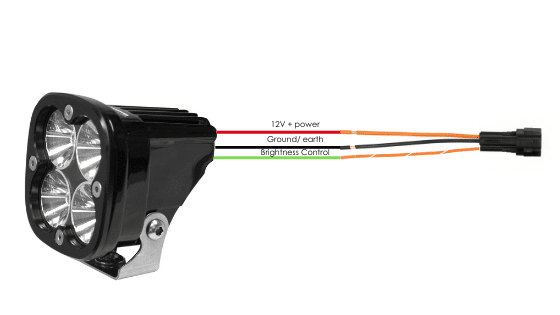
Connecting ‘smart’ Certified ezBUS-Ready accessories to a HEX ezCAN stub connector:
Lesen Sie die Abschnitte „HEX ezBUS“ und „Konfigurieren der HEX ezBUS-Funktionalität“ im HEX ezCAN-Benutzerhandbuch (hier herunterladbar), um detaillierte Informationen zur Verwendung der ezBUS-Funktionalität zu erhalten.
If you are installing ‘smart’ Certified ezBUS-Ready accessories (that is, accessories capable of intelligent input and control through the HEX ezCAN’s LIN bus), note the following:
Lesen Sie die Abschnitte „HEX ezBUS“ und „Konfigurieren der HEX ezBUS-Funktionalität“ im HEX ezCAN-Benutzerhandbuch (hier herunterladbar), um detaillierte Informationen zur Verwendung der ezBUS-Funktionalität zu erhalten.
Note that if the white circuit is set to ezBUS mode, its fuse trip limit is set to 15 Amps by default. If needed, ezBUS PWR functionality can be used to increase the white circuit’s current capacity to a suggested maximum of 25 Amps in ezBUS mode. See the relevant section of the HEX ezCAN User Manual for details.
WICHTIG:
The four output circuits on your ezCAN are colour-coded. When you plug in an accessory—like auxiliary lights, a horn, or a brake light—just take note of the wire colour for that specific circuit.
When you open the HEX ezCAN software, you’ll see those exact same colours listed under the Circuit Functions section. Simply match the software configuration to the wire colour you connected your accessory to, and you’re good to go!
Plug it in: Connect your accessory to a colour-coded circuit output.
Match it up: Open the ezCAN software and select the matching colour to assign its function.


Whether you’re fitting front spot lights, a extra rear brake light, a loud air horn, or your favourite heated kit, HEX ezCAN has you covered.
We offer a complete range of cables, adaptors, splitters, and connectors to help you wire up virtually any combination of electronic gear to your ezCAN—plus plenty of spare connectors to keep in your toolkit for future builds.
Click the links below to explore the full range of accessories:
WARNUNG: Testen und überprüfen Sie Ihre Installationen und Zubehörteile vor dem ersten Gebrauch in einer sicheren, kontrollierten Umgebung. Seien Sie stets vorsichtig. Bei der Erprobung neuer Funktionen oder Zubehörteile ist besondere Vorsicht geboten. Sie tun dies auf eigene Gefahr.
HAFTUNGSAUSSCHLUSS: HEX Innovate haftet nicht für Verletzungen oder Schäden, unabhängig von deren Ursache, und alle Produkte und Dienstleistungen werden auf eigene Gefahr genutzt.
Bevor Sie die Installation des HEX ezCAN abschließen oder eventuell entfernte Komponenten wieder einbauen, sollten Sie unbedingt alle neu installierten Zubehörteile auf korrekten Sitz und einwandfreie Funktion prüfen.
Viele mit HEX ezCAN betriebene Zubehörteile können getestet werden, indem die Zündung eingeschaltet und die entsprechenden Bedienelemente betätigt werden. Ausnahmen sind:
Führen Sie die Installation von HEX ezCAN wie folgt durch:

Sie werden nun zu unserer Hauptwebsite weitergeleitet, um unsere Datenschutzerklärung einzusehen.

Sie werden nun zu unserer Hauptwebsite weitergeleitet, um unsere rechtlichen Hinweise einzusehen.

Sie werden nun zu unserer Hauptwebsite weitergeleitet, um unsere rechtlichen Hinweise einzusehen.