Guía de instalación de HEX ezCAN

HEX ezCAN Everest for CFMOTO motorcycles

This is a step-by-step guide to installing the HEX ezCAN Everest for CFMOTO.

IMPORTANT: This installation guide is only applicable to the CFMOTO motorcycle models listed below.
If you are purchasing a HEX ezCAN for, or installing a HEX ezCAN on a CFMOTO that is not in the model list below, refer to the ‘Which HEX ezCAN?’ page to see if this acceesry manager supports your CFMOTO. If not, the HEX ezCAN PURE Universal Accessory Manager supports pretty much any 12V motorcycle, including models that do not have a CAN-bus system. 

HEX ezCAN Everest for CFMOTO motorcycles packaging:

Se admiten las siguientes bicicletas:

  • 800MT-X / [US model] IBEX 800E (2025+) *
  • 1000MT-X / [US model] IBEX 950 (2026+) **


See Partial Support details below

Due to the wiring harness limitations of CFMOTO 800 MT-X and 1000MT-X models, these models have the following functionality restrictions.

* 800MT-X / [US model] IBEX 950 (2026+):

  • Automatic auxiliary light dimming based on ambient day/night conditions is not supported on the 800MT-X, as the bike lacks a built-in ambient light sensor.

  • Heated gear integration is not supported on this model.


** 1000MT-X / [US model] IBEX 800E (2025+):

  • The CFMOTO 1000MT-X is fitted with an original equipment (OE) ambient light sensor. To enable the auxiliary lights’ variable intensity settings designed for this model, ensure the display is set to ‘Auto’ rather than ‘Day’ or ‘Night’. If fixed to either mode, the auxiliary lights will not automatically adjust to changing light conditions.

  • Using the HEX ezCAN Accessory Manager, you can link your heated gear directly to the power level of your heated grips. This allows the heat output of any connected clothing to adjust seamlessly in sync with your bike’s heated grip settings.

  • 1x HEX ezCAN Everest device (Black body)
  • 1 cable micro USB a USB A y C
  • 1x Horn trigger wire (Green)
  • 4 conectores de 2 cables (cableado negro/naranja)
  • 4 cables terminales de 1 cable (naranja)
  • 4 juntas de sellado en blanco
  • 3 tapones ciegos
  • 20 bridas para cables

Paso 1

Descargar, instalar y configurar el software

Getting Started: Initial Setup Checklist

Before you begin the physical installation, complete these quick preparation steps:

  1. Unbox your HEX ezCAN and check that all components are present.
  2. Plan your accessories: Decide which devices you want to install and check their power requirements.
  3. Note: Pay attention to specific circuit requirements. For instance, ‘smart’ Certified ezBUS-Ready accessories need to be wired into the ezBUS (White) power circuit.
  4. Review the manual: Read the Installing for Life section in the HEX ezCAN User Manual (available to download from the website) to make sure your planned setup meets the recommended guidelines.
  5. Register your device: Simply connect the HEX ezCAN to your computer using the provided USB cable. You can easily complete this step from the comfort of your desk before heading out to the bike.

Paso 2

Locate the Battery and OBD-II Diagnostics Connector

Tools Required
  • Flathead screwdriver (to remove plastic fasteners)
  • Philips screwdriver or 10mm Spanner (to remove the battery terminals)
  • 5mm Allen key (to remove panel screws)


Access the vehicle battery and OBD-II connector as follows:

  1. Retire los asientos del conductor y del acompañante.
  2. The bike’s battery is accessed by removing the battery cover located between the tank and the rider’s seat area.
  3. Use the flathead screwdriver to pop out the two plastic fasteners on the side panel.
  4. Use the 5mm Allen key to take out the three Allen screws (note that they may be different sizes).
  5. Gently pull the side panel until it pops free from its mountings.
  6. Pull the battery cover straight out; it is held in place by four clips that snap into notches.
  7. See Step 4 for the instructions on how to connect the HEX ezCAN to your bike’s battery.
  8. Cable Routing: The HEX ezCAN battery terminal cables can be routed to the left side of the rider’s seat area, and securred to the subframe.
  9. The HEX ezCAN Everest connects to the CFMOTO CAN-bus via the OBD-II Diagnostics Terminal (below, right).
  10. The Horn function is not available via the CAN-bus. If you wish to make use of the many auxiliary features that integrate with your CFMOTO horn, use the provided Horn Trigger Cable (the green wire with the  to connect your horn to the HEX ezCAN Everest. (See Step 5 for details)

Location of the Battery Terminals

Location of OBD-II Diagnostics Terminal

Paso 3

Conecte el HEX ezCAN al CAN-BUS de la bicicleta.

Connecting to the CAN-bus:

  1. Remove dust cover from the OBD-II terminal.
  2. Connect the HEX ezCAN Everest’s CAN-bus connector to the CFMOTO OBD-II terminal.
  3. Make sure that the connection is inserted straight and firmly pushed into the terminal.

Remove the OBD CAN-bus connector dust cover

Connect the HEX ezCAN Everest

Paso 4

Conecte el HEX ezCAN a la batería de la bicicleta.

The best location for the main body of the HEX ezCAN device is underneath the rider seat attachment brace, tucked towards the right hand side, of the battery cover. This way the device is protected, and you still have access to the device. 

When planning your accessory cables, ensure that the wiring is routed safely and securely, in a way that does not allow it to chafe or pinch. Where needed, secure all wiring to frame tubes or other components using the cable ties supplied with the HEX ezCAN installation kit.

ADVERTENCIA: Por razones de seguridad, desconecte siempre primero el terminal negativo de la batería y vuelva a conectarlo en último lugar. 

  1. Start the installation by locating the main body of the HEX ezCAN in a place that allows straightforward, logical wiring runs. We recommend installing the HEX ezCAN main body underneath the pillion seat area, as this allows easier access for firmware updates and diagnostics.
  2. Route the HEX ezCAN battery terminal connection underneath the sub-frame cross-brace. 
  3. Desconecte el terminal negativo del cableado del polo negativo de la batería.
  4. Desconecte el terminal positivo del arnés de cables del polo positivo de la batería.
  5. Conecte el terminal del cable de alimentación naranja ezCAN y el terminal del mazo de cables positivo de la motocicleta al polo positivo de la batería.
  6. Conecte el terminal del cable de alimentación marrón ezCAN y el terminal del arnés de cableado negativo de la motocicleta al polo negativo de la batería.
  7. Ordene el cableado del CAN-bus y de la batería. Fije todos los cables sueltos con las bridas incluidas en el kit de instalación HEX ezCAN.

Nota: El LED de estado del HEX ezCAN debe permanecer en verde fijo durante aproximadamente un minuto después de conectarlo a la batería. Transcurrido este tiempo, el HEX ezCAN entra en modo de suspensión y el LED permanecerá inactivo hasta que se encienda el contacto de la motocicleta.

Conecte el HEX ezCAN al terminal positivo de la batería y, a continuación, al terminal negativo.
Ordene y fije los cables. Asegúrese de tener fácil acceso a los cuatro enchufes del circuito de alimentación.

Connect the HEX ezCAN to the Bike's Horn

Paso 5

In between the CAN-bus connector and the HEX ezCAN Everest, you will find the horn tigger wire connector (black connector from a green wire). Before you attach the Horn Trigger Wire, locate the CFMOTO OE horn at the front of the bike, near or just underneath the radiator.

  1. Encienda el motor de la motocicleta.
  2. Localice la bocina de fábrica.
  3. Toque con la sonda negativa (negra) del multímetro el terminal negativo de la batería.
  4. Mientras presiona el botón de la bocina, toque con la sonda positiva (roja) uno de los terminales de la bocina y, a continuación, el otro.
  5. Whenever the horn is active, there will be a voltage change on only one of the horn terminals. The terminal on which the voltage change happens is the terminal to which you must connect the HORN Trigger Wire. The voltage change when the horn is activated will be from approximately 0V to approximately battery voltage.
 

A modo ilustrativo, las imágenes siguientes muestran un cable de alimentación del claxon de color negro. Tenga en cuenta que el cable de alimentación identificado en su motocicleta puede tener un color diferente.

Una vez identificado el terminal de alimentación correcto de la bocina, conecte el divisor de bocina de la siguiente manera:

  1. Route the Horn Trigger Wire back to the HEX ezCAN Everest CAN-bus connector and attach the single-pin plug on the open end of the green horn trigger wire to the single-pin plug on the open end of the green wire on the HEX ezCAN Everest (below).
  1. Remove wire’s spade from the identified signal wire on the factory horn terminal (below).
    During our tests we found the top connector to be the signal connector on the CFMOTO 800MT-X, and the bottom connector on the 1000MT-X. But check your motorcycle using the steps listed above. 
  1. Conecte el terminal macho + hembra del divisor de bocina al terminal macho expuesto en la bocina (abajo).
  1. Conecte el terminal hembra en forma de pala desconectado al terminal macho expuesto en el divisor de bocina (abajo).

Paso 6

Conecte los accesorios utilizando el código de colores.

El kit de instalación HEX ezCAN incluye cuatro conectores de dos cables con terminales de conexión macho, cables de alimentación naranjas y cables de tierra negros.

También se incluyen las siguientes piezas:

  • 4 cables terminales de modulación por ancho de pulso (PWM) (naranja con trazador blanco)
  • 4 juntas de goma


If the accessory to be connected to a power circuit has three wires, convert a two-wire stub connector to a three-wire connector as shown in the Connecting 3-wire LED lights section of the HEX ezCAN User Manual (downloadable from here).

Si el accesorio que se va a conectar a un circuito de alimentación tiene dos cables, selle la cavidad del terminal vacío del conector corto tal y como se muestra en la sección «Conexión de accesorios de 2 cables» del Manual del usuario de HEX ezCAN.

Si no se va a utilizar alguno de los circuitos de alimentación del HEX ezCAN, recomendamos conectar un tapón de obturación al conector de salida de cada circuito no utilizado.

Aplicaciones de 2 hilos: inserte un sello de obturación. Aplicaciones de 3 hilos: inserte un cable terminal PWM.
4 cables terminales y sellos ciegos
4 conectores de dos cables

Conecte el terminal macho de cada conector corto al conector hembra HEX ezCAN del circuito de alimentación correspondiente (abajo).

Conexión de un accesorio de 2 cables a un conector HEX ezCAN:

  1. Conecte el cable de tierra/masa del accesorio (que suele ser, aunque no siempre, de color negro o marrón) al cable de tierra de un conector HEX ezCAN.
  2. Conecte el cable de alimentación del accesorio (que suele ser rojo, aunque no siempre) al cable de alimentación de 12 V de un conector HEX ezCAN.


Conexión de un accesorio de 3 cables a un conector HEX ezCAN:
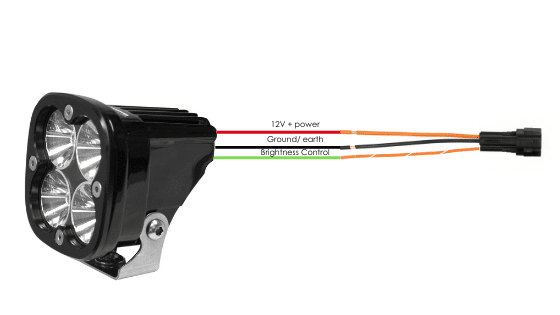
  1. Conecte el cable de tierra y el cable de alimentación del accesorio tal y como se ha descrito anteriormente.
  2. Conecte el cable de control PWM del accesorio al cable de dos colores (color sólido + trazador) de un conector ezCAN stub.

Connecting ‘smart’ Certified ezBUS-Ready accessories to a HEX ezCAN stub connector:

Lea las secciones «HEX ezBUS» y «Configuración de la funcionalidad HEX ezBUS» del manual del usuario de HEX ezCAN (que puede descargarse aquí) para obtener información detallada sobre cómo utilizar la funcionalidad ezBUS.

If you are installing ‘smart’ Certified ezBUS-Ready accessories (that is, accessories capable of intelligent input and control through the HEX ezCAN’s LIN bus), note the following:

  1. Los accesorios inteligentes (incluido el HEX ezSWITCH) solo deben conectarse al circuito de alimentación ezBUS (blanco) del HEX ezCAN. Los accesorios inteligentes no funcionarán si se conectan a los circuitos rojo, amarillo o azul.
  2. The ezBUS (white) power circuit can accommodate upto a maximum of fifteen Certified ezBUS-Ready accessories.
  3. Hay disponible una selección de adaptadores y conectores HEX ezBUS que le permiten conectar accesorios inteligentes de forma rápida y sencilla. Consulte la sección Accesorios ezBUS de la tienda online HEX Innovate para obtener más información.

Lea las secciones «HEX ezBUS» y «Configuración de la funcionalidad HEX ezBUS» del manual del usuario de HEX ezCAN (que puede descargarse aquí) para obtener información detallada sobre cómo utilizar la funcionalidad ezBUS.

Note that if the white circuit is set to ezBUS mode, its fuse trip limit is set to 15 Amps by default. If needed, ezBUS PWR functionality can be used to increase the white circuit’s current capacity to a suggested maximum of 25 Amps in ezBUS mode. See the relevant section of the HEX ezCAN User Manual for details.

IMPORTANTE:

The four output circuits on your ezCAN are colour-coded. When you plug in an accessory—like auxiliary lights, a horn, or a brake light—just take note of the wire colour for that specific circuit.

When you open the HEX ezCAN software, you’ll see those exact same colours listed under the Circuit Functions section. Simply match the software configuration to the wire colour you connected your accessory to, and you’re good to go!

  • Plug it in: Connect your accessory to a colour-coded circuit output.

  • Match it up: Open the ezCAN software and select the matching colour to assign its function.

Easier Installation with the HEX ezCAN Accessories

Whether you’re fitting front spot lights, a extra rear brake light, a loud air horn, or your favourite heated kit, HEX ezCAN has you covered.

We offer a complete range of cables, adaptors, splitters, and connectors to help you wire up virtually any combination of electronic gear to your ezCAN—plus plenty of spare connectors to keep in your toolkit for future builds.

Click the links below to explore the full range of accessories:

Paso 7

Prueba la instalación

ADVERTENCIA: Pruebe y compruebe sus instalaciones y accesorios en un entorno seguro y controlado antes de utilizarlos por primera vez. Se recomienda precaución en todo momento. Se requiere especial atención al probar nuevas funciones o accesorios. Lo hace bajo su propia responsabilidad.

DESCARGO DE RESPONSABILIDAD: HEX Innovate no se hace responsable de ninguna lesión o daño, independientemente de su causa, y todos los productos y servicios se utilizan bajo su propia responsabilidad.

Antes de finalizar la instalación de HEX ezCAN o reinstalar cualquier componente que haya retirado, es importante que compruebe que todos los accesorios recién instalados se ajustan correctamente y funcionan de forma satisfactoria.

Muchos accesorios que funcionan con HEX ezCAN pueden probarse encendiendo el motor y accionando los controles correspondientes. Las excepciones son:

  • Accesorios para los que ha activado la función Solo cuando el motor está en marcha (por ejemplo, luces Aux 1, luces Aux 2, MotoLights y ropa calefactada). Para probar estas funciones, el motor de la motocicleta debe estar en marcha.
  • Algunas funciones de las luces de freno requieren que la motocicleta se desplace a una velocidad igual o superior a una determinada. Por ejemplo, las funciones «Flash on Emergency Stop» (destello en parada de emergencia) y «Flash on Rapid Engine Braking» (destello en frenado rápido del motor) requieren una desaceleración superior a 21 kilómetros por hora por segundo.

Paso 8

Completa la instalación.

Complete la instalación de HEX ezCAN de la siguiente manera:

  1. Asegúrese de que el cuerpo principal del HEX ezCAN esté bien sujeto en un lugar donde esté protegido de la presión, el calor y los impactos.
  2. Asegúrese de que todos los cables y mazos de cables de fábrica, ezCAN y accesorios estén bien alejados de todas las piezas móviles y bien sujetos. Cuando sea necesario, utilice las bridas para cables incluidas en el kit de instalación HEX ezCAN.
  3. Vuelva a colocar todos los componentes y elementos de fijación de la motocicleta que se hayan retirado para facilitar la instalación del ezCAN.
  4. Inspeccione toda la instalación en busca de errores o problemas y solucione todos los problemas que haya detectado.
  5. Compruebe por segunda vez que todos los accesorios nuevos funcionan correctamente.
  6. Si aún no lo ha hecho, descargue el manual de usuario de HEX ezCAN desde esta página. Guarde el manual en un lugar seguro en su ordenador, tableta o teléfono: contiene toda la información que necesita para manejar el HEX ezCAN y ajustar su funcionalidad.

¡Atención!

Ahora se le redirigirá a nuestro sitio web principal para que pueda consultar nuestra Política de privacidad.

¡Atención!

Ahora se le redirigirá a nuestro sitio web principal para que pueda consultar nuestra información legal.

¡Atención!

Ahora se le redirigirá a nuestro sitio web principal para que pueda consultar nuestra información legal.