This is a step-by-step guide to installing the HEX ezCAN Everest for CFMOTO.
IMPORTANT: This installation guide is only applicable to the CFMOTO motorcycle models listed below. If you are purchasing a HEX ezCAN for, or installing a HEX ezCAN on a CFMOTO that is not in the model list below, refer to the ‘Which HEX ezCAN?’ page to see if this acceesry manager supports your CFMOTO. If not, the HEX ezCAN PURE Universal Accessory Manager supports pretty much any 12V motorcycle, including models that do not have a CAN-bus system.
HEX ezCAN Everest for CFMOTO motorcycles packaging:
Sono supportate le seguenti biciclette:
800MT-X / [US model] IBEX 800E (2025+) *
1000MT-X / [US model] IBEX 950 (2026+) **
See Partial Support details below
Partial Support
Due to the wiring harness limitations of CFMOTO 800 MT-X and 1000MT-X models, these models have the following functionality restrictions.
* 800MT-X / [US model] IBEX 950 (2026+):
Automatic auxiliary light dimming based on ambient day/night conditions is not supported on the 800MT-X, as the bike lacks a built-in ambient light sensor.
Heated gear integration is not supported on this model.
** 1000MT-X / [US model] IBEX 800E (2025+):
The CFMOTO 1000MT-X is fitted with an original equipment (OE) ambient light sensor. To enable the auxiliary lights’ variable intensity settings designed for this model, ensure the display is set to ‘Auto’ rather than ‘Day’ or ‘Night’. If fixed to either mode, the auxiliary lights will not automatically adjust to changing light conditions.
Using the HEX ezCAN Accessory Manager, you can link your heated gear directly to the power level of your heated grips. This allows the heat output of any connected clothing to adjust seamlessly in sync with your bike’s heated grip settings.
Cosa c'è nella confezione
1x HEX ezCAN Everest device (Black body)
1 cavo da micro USB a USB A e C
1x Horn trigger wire (Green)
4 connettori a 2 fili (cablaggio nero/arancione)
4 cavi terminali a 1 filo (arancione)
4 guarnizioni di tenuta
3 tappi ciechi
20x fascette per cavi
Passaggio 1: scaricare, installare e configurare il software
Passaggio 1
Scaricare, installare e configurare il software
Getting Started: Initial Setup Checklist
Before you begin the physical installation, complete these quick preparation steps:
Unbox your HEX ezCAN and check that all components are present.
Plan your accessories: Decide which devices you want to install and check their power requirements.
Note: Pay attention to specific circuit requirements. For instance, ‘smart’ Certified ezBUS-Ready accessories need to be wired into the ezBUS (White) power circuit.
Review the manual: Read the Installing for Life section in the HEX ezCAN User Manual (available to download from the website) to make sure your planned setup meets the recommended guidelines.
Register your device: Simply connect the HEX ezCAN to your computer using the provided USB cable. You can easily complete this step from the comfort of your desk before heading out to the bike.
Philips screwdriver or 10mm Spanner (to remove the battery terminals)
5mm Allen key (to remove panel screws)
Access the vehicle battery and OBD-II connector as follows:
Rimuovere la sella del pilota e quella del passeggero.
The bike’s battery is accessed by removing the battery cover located between the tank and the rider’s seat area.
Use the flathead screwdriver to pop out the two plastic fasteners on the side panel.
Use the 5mm Allen key to take out the three Allen screws (note that they may be different sizes).
Gently pull the side panel until it pops free from its mountings.
Pull the battery cover straight out; it is held in place by four clips that snap into notches.
See Step 4 for the instructions on how to connect the HEX ezCAN to your bike’s battery.
Cable Routing: The HEX ezCAN battery terminal cables can be routed to the left side of the rider’s seat area, and securred to the subframe.
The HEX ezCAN Everest connects to the CFMOTO CAN-bus via the OBD-II Diagnostics Terminal (below, right).
The Horn function is not available via the CAN-bus. If you wish to make use of the many auxiliary features that integrate with your CFMOTO horn, use the provided Horn Trigger Cable (the green wire with the to connect your horn to the HEX ezCAN Everest. (See Step 5 for details)
Location of the Battery Terminals
Location of OBD-II Diagnostics Terminal
Passaggio 3: collegare HEX ezCAN al CAN-BUS della bicicletta
Fase 3
Collegare HEX ezCAN al CAN-BUS della bicicletta.
Connecting to the CAN-bus:
Remove dust cover from the OBD-II terminal.
Connect the HEX ezCAN Everest’s CAN-bus connector to the CFMOTO OBD-II terminal.
Make sure that the connection is inserted straight and firmly pushed into the terminal.
Remove the OBD CAN-bus connector dust cover
Connect the HEX ezCAN Everest
Passaggio 4: collegare HEX ezCAN alla batteria della bicicletta
Fase 4
Collegare HEX ezCAN alla batteria della bicicletta
The best location for the main body of the HEX ezCAN device is underneath the rider seat attachment brace, tucked towards the right hand side, of the battery cover. This way the device is protected, and you still have access to the device.
When planning your accessory cables, ensure that the wiring is routed safely and securely, in a way that does not allow it to chafe or pinch. Where needed, secure all wiring to frame tubes or other components using the cable ties supplied with the HEX ezCAN installation kit.
ATTENZIONE: per motivi di sicurezza, scollegare sempre prima il terminale negativo della batteria e ricollegarlo per ultimo.
Start the installation by locating the main body of the HEX ezCAN in a place that allows straightforward, logical wiring runs. We recommend installing the HEX ezCAN main body underneath the pillion seat area, as this allows easier access for firmware updates and diagnostics.
Route the HEX ezCAN battery terminal connection underneath the sub-frame cross-brace.
Scollegare il terminale negativo del cablaggio dal polo negativo della batteria.
Scollegare il terminale positivo del cablaggio dal polo positivo della batteria.
Collegare il terminale del cavo di alimentazione ezCAN arancione e il terminale del cablaggio positivo della moto al polo positivo della batteria.
Collegare il terminale del cavo di alimentazione ezCAN marrone e il terminale negativo del cablaggio della moto al polo negativo della batteria.
Riordina il cablaggio del CAN-bus e della batteria. Fissa tutti i cavi sciolti utilizzando le fascette incluse nel kit di installazione HEX ezCAN.
Nota: il LED di stato dell'HEX ezCAN dovrebbe rimanere verde fisso per circa un minuto dopo il collegamento alla batteria. Trascorso questo tempo, l'HEX ezCAN entra in modalità Sleep e il LED non sarà più attivo fino all'accensione della moto.
Collegare HEX ezCAN al terminale positivo della batteria, quindi al terminale negativo della batteria. Riordina e fissa i cavi. Assicurati di avere facile accesso alle quattro spine del circuito di alimentazione.
Step 5 Connect the HEX ezCAN to the Bike's Horn
Connect the HEX ezCAN to the Bike's Horn
Passaggio 5
In between the CAN-bus connector and the HEX ezCAN Everest, you will find the horn tigger wire connector (black connector from a green wire). Before you attach the Horn Trigger Wire, locate the CFMOTO OE horn at the front of the bike, near or just underneath the radiator.
Toccare con la sonda negativa (nera) del multimetro il terminale negativo della batteria.
Tenendo premuto il pulsante del clacson, toccare con la sonda positiva (rossa) uno dei terminali del clacson, poi l'altro.
Whenever the horn is active, there will be a voltage change on only one of the horn terminals. The terminal on which the voltage change happens is the terminal to which you must connect the HORN Trigger Wire. The voltage change when the horn is activated will be from approximately 0V to approximately battery voltage.
A scopo illustrativo, le immagini sottostanti mostrano un cavo di alimentazione del clacson di colore nero. Si noti che il cavo di alimentazione identificato sulla propria motocicletta potrebbe avere un colore diverso.
Una volta individuato il terminale di alimentazione corretto per il clacson, collegare il divisore del clacson come segue:
Route the Horn Trigger Wire back to the HEX ezCAN Everest CAN-bus connector and attach the single-pin plug on the open end of the green horn trigger wire to the single-pin plug on the open end of the green wire on the HEX ezCAN Everest (below).
Remove wire’s spade from the identified signal wire on the factory horn terminal (below). During our tests we found the top connector to be the signal connector on the CFMOTO 800MT-X, and the bottom connector on the 1000MT-X. But check your motorcycle using the steps listed above.
Collegare il terminale a forcella maschio+femmina dello splitter del clacson al terminale maschio esposto sul clacson (sotto).
Collegare il terminale a forcella femmina scollegato al terminale maschio esposto sullo splitter dell'avvisatore acustico (sotto).
Passaggio 6: collegare gli accessori utilizzando la codifica a colori
Passaggio 6
Collegare gli accessori utilizzando il codice colore
Il kit di installazione HEX ezCAN include quattro connettori a due fili con terminali di connessione maschio, cavi di alimentazione arancioni e cavi di terra neri.
Sono incluse anche le seguenti parti:
4 cavi terminali con modulazione di larghezza di impulso (PWM) (arancione con tracciante bianco)
4 guarnizioni di tenuta in gomma
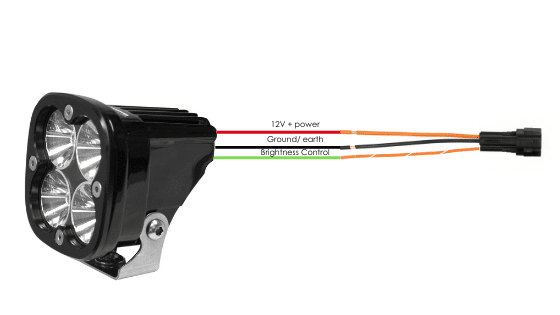
If the accessory to be connected to a power circuit has three wires, convert a two-wire stub connector to a three-wire connector as shown in the Connecting 3-wire LED lights section of the HEX ezCAN User Manual (downloadable from here).
Se l'accessorio da collegare a un circuito di alimentazione ha due fili, sigillare la cavità terminale vuota del connettore stub come illustrato nella sezione Collegamento di accessori a 2 fili del Manuale utente HEX ezCAN.
Se uno qualsiasi dei circuiti di alimentazione dell'HEX ezCAN non verrà utilizzato, si consiglia di collegare un tappo di chiusura alla presa di uscita di ciascun circuito inutilizzato.
Applicazioni a 2 fili: inserire una guarnizione di chiusura. Applicazioni a 3 fili: inserire un filo terminale PWM.
4 x Fili terminali e guarnizioni di chiusura
4 connettori a due fili
Collegare il terminale maschio di ciascun connettore stub al relativo connettore femmina HEX ezCAN del circuito di alimentazione (sotto).
Collegamento di un accessorio a 2 fili a un connettore stub HEX ezCAN:
Collegare il cavo di terra dell'accessorio (di solito, ma non sempre, di colore nero o marrone) al cavo di terra di un connettore stub HEX ezCAN.
Collegare il cavo di alimentazione dell'accessorio (di solito, ma non sempre, di colore rosso) al cavo di alimentazione a 12 V di un connettore stub HEX ezCAN.
Collegamento di un accessorio a 3 fili a un connettore stub HEX ezCAN:
Collegare il cavo di terra e il cavo di alimentazione dell'accessorio come descritto sopra.
Collegare il cavo di controllo PWM dell'accessorio al cavo bicolore (colore solido + tracciante) di un connettore stub ezCAN.
Connecting ‘smart’ Certified ezBUS-Ready accessories to a HEX ezCAN stub connector:
Per informazioni dettagliate sull'utilizzo della funzionalità ezBUS, leggere le sezioni HEX ezBUS e Configurazione della funzionalità HEX ezBUS del manuale utente HEX ezCAN (scaricabile da qui).
If you are installing ‘smart’ Certified ezBUS-Ready accessories (that is, accessories capable of intelligent input and control through the HEX ezCAN’s LIN bus), note the following:
Gli accessori intelligenti (incluso HEX ezSWITCH) devono essere collegati esclusivamente al circuito di alimentazione ezBUS (bianco) di HEX ezCAN. Gli accessori intelligenti non funzionano se collegati ai circuiti rosso, giallo o blu.
The ezBUS (white) power circuit can accommodate upto a maximum of fifteen Certified ezBUS-Ready accessories.
È disponibile una selezione di adattatori e connettori HEX ezBUS che consentono di collegare accessori intelligenti in modo semplice e veloce. Per ulteriori dettagli, consultare la sezione Accessori ezBUS del negozio online HEX Innovate.
Per informazioni dettagliate sull'utilizzo della funzionalità ezBUS, leggere le sezioni HEX ezBUS e Configurazione della funzionalità HEX ezBUS del manuale utente HEX ezCAN (scaricabile da qui).
Note that if the white circuit is set to ezBUS mode, its fuse trip limit is set to 15 Amps by default. If needed, ezBUS PWR functionality can be used to increase the white circuit’s current capacity to a suggested maximum of 25 Amps in ezBUS mode. See the relevant section of the HEX ezCAN User Manual for details.
IMPORTANTE:
The four output circuits on your ezCAN are colour-coded. When you plug in an accessory—like auxiliary lights, a horn, or a brake light—just take note of the wire colour for that specific circuit.
When you open the HEX ezCAN software, you’ll see those exact same colours listed under the Circuit Functions section. Simply match the software configuration to the wire colour you connected your accessory to, and you’re good to go!
Plug it in: Connect your accessory to a colour-coded circuit output.
Match it up: Open the ezCAN software and select the matching colour to assign its function.
Easier Installation with the HEX ezCAN Accessories
Whether you’re fitting front spot lights, a extra rear brake light, a loud air horn, or your favourite heated kit, HEX ezCAN has you covered.
We offer a complete range of cables, adaptors, splitters, and connectors to help you wire up virtually any combination of electronic gear to your ezCAN—plus plenty of spare connectors to keep in your toolkit for future builds.
Click the links below to explore the full range of accessories:
ATTENZIONE: prima dell'uso, testare e controllare le installazioni e gli accessori in un ambiente sicuro e controllato. Si raccomanda di prestare attenzione in ogni momento. È necessaria una maggiore vigilanza quando si testano nuove funzionalità o accessori. L'utente agisce a proprio rischio.
DISCLAIMER: HEX Innovate non è responsabile per eventuali lesioni o danni, indipendentemente dalla causa, e tutti i prodotti e servizi sono utilizzati a proprio rischio.
Prima di completare l'installazione di HEX ezCAN o di reinstallare eventuali componenti rimossi, è importante verificare che tutti gli accessori appena installati siano montati correttamente e funzionino in modo soddisfacente.
Molti accessori alimentati da HEX ezCAN possono essere testati accendendo il motore e azionando i comandi corrispondenti. Fanno eccezione:
Accessori per i quali è stata attivata la funzione Solo a motore acceso (ad esempio luci Aux 1, luci Aux 2, MotoLights e abbigliamento riscaldato). Per testare queste funzioni, il motore della moto deve essere acceso.
Alcune funzioni delle luci dei freni richiedono che la moto viaggi a una velocità pari o superiore a un determinato valore. Ad esempio, le funzioni "Flash on Emergency Stop " (lampeggiamento in caso di arresto di emergenza) e "Flash on Rapid Engine Braking " (lampeggiamento in caso di frenata rapida del motore) richiedono una decelerazione superiore a 21 chilometri all'ora al secondo.
Passaggio 8: Completare l'installazione
Passaggio 8
Completa l'installazione
Completa l'installazione di HEX ezCAN come segue:
Assicurarsi che il corpo principale dell'HEX ezCAN sia ben fissato in un luogo protetto da pressione, calore e urti.
Assicurarsi che tutti i cavi e i cablaggi di fabbrica, ezCAN e accessori siano ben distanziati da tutte le parti mobili e fissati saldamente. Se necessario, utilizzare le fascette incluse nel kit di installazione HEX ezCAN.
Sostituire tutti i componenti e gli elementi di fissaggio della motocicletta che potrebbero essere stati rimossi per facilitare l'installazione di ezCAN.
Controlla l'intera installazione per individuare eventuali errori o problemi e risolvi tutti i problemi che hai riscontrato.
Verificare nuovamente il corretto funzionamento di tutti i nuovi accessori.
Se non l'hai ancora fatto, scarica il manuale utente di HEX ezCAN da questa pagina. Conserva il manuale in un luogo sicuro sul tuo computer, tablet o telefono: contiene tutte le informazioni necessarie per utilizzare HEX ezCAN e regolarne le funzionalità.
Attenzione!
Verrai ora reindirizzato al nostro sito web principale per visualizzare la nostra Informativa sulla privacy.
Utilizziamo i cookie per assicurarti la migliore esperienza possibile sul nostro sito web. Se continui a utilizzare questo sito, presupporremo che tu ne sia soddisfatto.