HEX ezCAN Installation

HEX ezCAN Gobi for KTM and HEX ezCAN II for KTM

What is the difference between the HEX ezCAN Gobi for KTM, and the HEX ezCAN II for KTM?

In the past, HEX Innovate offered two different HEX ezCAN Accessory Managers for KTM motorcycles:

  • The HEX ezCAN Gobi for KTM, designed specifically for newer KTM models.
  • The HEX ezCAN II for KTM, designed specifically for earlier KTM models.

These two ezCANs used different CAN-bus connectors to interface with the motorcycle’s CAN-bus.

In February 2025, HEX Innovate introduced the HEX ezCAN JWPF-to-HMS Adapter Cable, allowing the HEX ezCAN Gobi for KTM to interface with all earlier KTM models previously covered by the HEX ezCAN II for KTM. As a result, the HEX ezCAN Gobi for KTM has replaced the HEX ezCAN II for KTM.

KTM model compatibility

This is a step-by-step guide to installing the HEX ezCAN Gobi for KTM on compatible KTM models.

If you are unsure whether your KTM is compatible with the HEX ezCAN Gobi for KTM, read the HEX ezCAN/KTM compatibility information below.

The current HEX ezCAN Gobi for KTM supports the following KTM models equipped with the red Euro 5-type diagnostic connector:

  • All 1290 models from 2021 onward
  • All 890 models (partial support)
  • All 790 models (partial support)


If the JWPF-to-Euro 5 adaptor included in the HEX ezCAN installation kit is replaced by a HEX JWPF-to-HMS adaptor, the HEX ezCAN Gobi for KTM also supports the following KTM models:

  • Tous les modèles 1290 jusqu'en 2020
  • Tous les modèles 1190
  • Tous les modèles 1090
  • Tous les modèles 1050
  • All 790 models equipped with HMS-type diagnostic connector (partial support)


The Euro 5-type diagnostic connector used on later KTM models looks like this:

For information on how to use the HEX ezCAN Gobi on HMS connector-equipped KTMS, see Using the HEX ezCAN Gobi on earlier KTM models below.

In February 2025, HEX Innovate launched the HEX ezCAN JWPF-to-HMS Adaptor Cable (below). This adapter cable allows the HEX ezCAN Gobi for KTM to support all earlier KTM models previously supported by the HEX ezCAN II for KTM.

To use a HEX ezCAN Gobi for KTM on any earlier KTM model equipped with a white HMS-type diagnostic connector, do the steps that follow:

  1. Unplug the JWPF-to-Euro 5 adaptor cable from the HEX ezCAN Gobi (below).
  2. Connect the JWPF-to-HMS adaptor cable to the HEX ezCAN Gobi (below).

Due to the wiring harness limitations of KTM 790 and 890 models, these models have the following functionality restrictions:
  • Les feux de freinage auxiliaires s'activent uniquement lorsque le frein avant est utilisé.
  • Front auxiliary lights cannot be toggled on and off using the bike’s handlebar-mounted controls. For workarounds and auxiliary light hardware control options, refer to the Operating auxiliary front lights section of the HEX ezCAN User Manual. Download the manual from this page.
  • La fonctionnalité HEX ezCAN qui dépend des clignotants n'est pas disponible.
  • La fonctionnalité HEX ezCAN qui éteint ou fait clignoter les feux avant auxiliaires lors de l'activation des clignotants n'est pas disponible.
  • La prise en charge des fonctionnalités d'accélération/freinage/clignotant n'est pas disponible.
  • La prise en charge des équipements chauffants n'est pas disponible.
Contenu du kit d'installation HEX ezCAN :
  • 1x HEX ezCAN Device
  • 1x MicroUSB to USB A and C cable
  • 3 bouchons d'obturation
  • 20 attaches de câble
  • 4 connecteurs à 2 fils (câblage noir/orange)
  • 4 fils de raccordement à 1 fil (orange)
  • 4 joints d'étanchéité en caoutchouc

The discontinued HEX ezCAN II for KTM supports the following KTM models equipped with the white HMS-type diagnostic connector:

  • All 1290 models (up to 2020)
  • Tous les modèles 1190
  • Tous les modèles 1090
  • Tous les modèles 1050
  • All 790 models (partial support)


The HMS-type diagnostic connector used on earlier KTM models looks like this:

Due to the wiring harness limitations of KTM 790 models, these models have the following functionality restrictions:
  • Les feux de freinage auxiliaires s'activent uniquement lorsque le frein avant est utilisé.
  • Front auxiliary lights cannot be toggled on and off using the bike’s handlebar-mounted controls. For workarounds and auxiliary light hardware control options, refer to the Operating auxiliary front lights section of the HEX ezCAN User Manual. Download the manual from this page.
  • La fonctionnalité HEX ezCAN qui dépend des clignotants n'est pas disponible.
  • La fonctionnalité HEX ezCAN qui éteint ou fait clignoter les feux avant auxiliaires lors de l'activation des clignotants n'est pas disponible.
  • La prise en charge des fonctionnalités d'accélération/freinage/clignotant n'est pas disponible.
  • La prise en charge des équipements chauffants n'est pas disponible.
  • 1x HEX ezCAN device
  • 1x MicroUSB to USB A and C cable
  • 2 bandes Velcro
  • 2x blanking plugs
  • 4 attaches de câble
  • 4 connecteurs à 2 fils (câblage noir/orange)
  • 4 fils de raccordement à 1 fil (orange)
  • 4 joints d'étanchéité en caoutchouc
  • 1x green horn harness
  • 1x piggyback terminal

Step 1:

Télécharger, installer et configurer le logiciel

C'est le moment idéal pour :

  • Déballez le HEX ezCAN.
  • Déterminez quels accessoires vous allez installer, leur nombre et leurs exigences. Certains accessoires doivent-ils être connectés d'une manière spécifique et/ou à des circuits électriques spécifiques ? À titre d'exemple, les accessoires « intelligents » à faible consommation doivent généralement être installés sur le circuit électrique ezBUS (blanc).
  • Lisez la section« Installation pour la vie» du manuel d'utilisation HEX ezCAN (téléchargeable ici) et évaluez votre installation prévue conformément aux directives fournies dans cette section.
  • Enregistrez votre HEX ezCAN (Pour enregistrer l'ezCAN, il vous suffit de le connecter à votre ordinateur à l'aide du câble USB fourni, ce qui signifie que vous pouvez le faire confortablement depuis votre bureau.)

Step 2:

Localisez le connecteur de diagnostic et la batterie.

In most cases, the battery and diagnostic connector are located under a seat, or forward of a seat.
In case of difficulty, refer to your motorcycle’s user manual for exact component locations.

Step 2A: Locate the diagnostic connector and battery

Refer to the relevant sub-section below.

The diagnostic connector and battery are located under the front seat or one-piece seat.

The diagnostic connector and battery are located under the centre trim panel, forward of the front seat.

The diagnostic connector and battery are located under the rear seat.

Step 2B: Locate the horn

On most models, the factory horn is located below the headlight, or below the front fairing.
In case of difficulty, refer to your motorcycle’s user manual for exact component locations.

Step 3:

Branchez le HEX ezCAN sur le CAN-BUS.
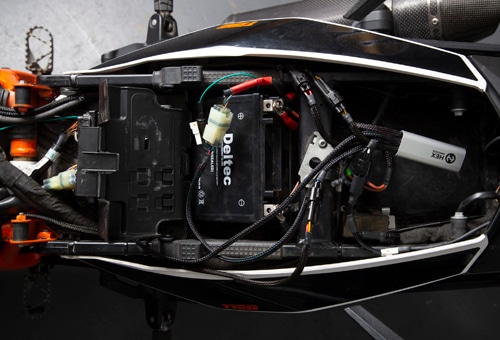
IMPORTANT : Ne connectez pasle connecteur CAN-bus du HEX ezCAN à une autre partie de la moto que le connecteur de diagnostic. Si vous le faites, l'ezCAN ne fonctionnera pas.

  1. Install the main body of the HEX ezCAN in the vicinity of the bike’s diagnostic connector. In the example on the right, the main body has been installed under the rear part of the seat.
  2. Retirez le capuchon de protection du connecteur de diagnostic du vélo.
  3. Connect the correct diagnostic connector adaptor cable to the HEX ezCAN as follows:
    • If your motorcycle has a red Euro 5 diagnostic connector, plug the JWPF-to-Euro 5 adaptor cable into the HEX ezCAN’s male JWPF connector.
    • If your motorcycle has a white HMS diagnostic connector, plug the JWPF-to-HMS adaptor cable into the HEX ezCAN’s male JWPF connector.
  4. Connect the HEX ezCAN’s Euro 5 plug or HMS plug to the motorcycle’s diagnostic connector.

Step 4:

Connectez le HEX ezCAN à la batterie du vélo.

Le cheminement du câble HEX ezCAN peut dépendre d'un certain nombre de facteurs, notamment de vos préférences personnelles.

Assurez-vous que le câblage est acheminé de manière sûre et sécurisée, de façon à éviter tout frottement ou pincement. Si nécessaire, fixez tous les câbles aux tubes du cadre ou à d'autres composants à l'aide des attaches fournies avec le kit d'installation HEX ezCAN.

AVERTISSEMENT :pour des raisons de sécurité, débranchez toujours la borne négative de la batterie en premier et rebranchez-la en dernier. 

  1. Start the installation by locating the main body of the HEX ezCAN in a place that allows straightforward, logical wiring runs. We recommend installing the ezCAN main body under a seat, in the vicinity of the diagnostic connector, as this allows easier access for firmware updates and diagnostics.
  2. Débranchez la borne négative du faisceau de câbles du pôle négatif de la batterie.
  3. Débranchez la borne positive du faisceau de câbles du pôle positif de la batterie.
  4. Route the HEX ezCAN’s power supply cables to the battery.
  5. Connectez la borne du câble d'alimentation orange ezCAN et la borne positive du faisceau de câbles du vélo à la borne positive de la batterie.
  6. Connectez la borne du câble d'alimentation ezCAN marron et la borne négative du faisceau de câbles de la moto à la borne négative de la batterie.
  7. Rangez le câble CAN-bus et le câble de batterie. Fixez tous les câbles lâches à l'aide des attaches fournies dans le kit d'installation HEX ezCAN, en veillant à pouvoir accéder facilement aux quatre fiches du circuit d'alimentation.


Note:
 The HEX ezCAN’s status LED should be solid green for approximately a minute after connection to the battery. After this time, the ezCAN enters Sleep Mode, and there will be no LED activity until the bike’s ignition is switched ON.

Step 5:

Connect the horn trigger wire

The CAN-bus on compatible KTM models does not include a horn trigger signal. To be able to activate an accessory horn when the horn button is pressed, a separate horn trigger input to the HEX ezCAN is needed.

IMPORTANT: Even if you do not want to install an auxiliary horn on a compatible KTM, the green horn trigger wire included in the HEX ezCAN installation kit must be installed if you will be configuring front auxiliary lights to strobe on horn activation.

Enabling accessory horn triggering

  1. Locate the factory KTM horn on your bike (See Step 2B above).
  2. Be aware of the following regarding factory KTM horns:
    • KTM horns usually have two male spade terminals.
    • KTM wiring harnesses connect to the horn either through two separate female spade terminals (left, below), or through an integrated plastic connector (right, below).
    • The colours of the factory KTM horn wires are usually either:
      • Grey and yellow with blue tracer, or
      • Grey and brown (as used in the example above).
  1. Do the following with the green horn trigger lead included in the HEX ezCAN installation kit (below):
    • Connect the male single-pin plug (left connector) to the single-pin female terminal leading from the main body of the HEX ezCAN.
    • Connect the male+female spade connector (right connector) to the factory KTM horn as shown below.

If the factory horn harness has separate female spade terminals:

  1. Disconnect the KTM horn harness female spade terminal with the grey wire from the factory horn (below).

2. Connect the HEX ezCAN horn trigger lead’s male+female spade terminal to the exposed male terminal on the horn (below).

3. Connect the KTM horn harness female spade terminal with the grey wire to the exposed male terminal on the HEX ezCAN horn trigger lead (below).

If the factory horn harness has an integrated plastic connector:

  1. Make a note of the factory wire-colour-to-terminal assignments on the KTM horn.
  2. Disconnect the KTM’s integrated horn harness connector from the horn (below).

3. Connect the HEX ezCAN horn trigger lead’s male+female spade terminal to the exposed male horn terminal that the grey wire was connected to (below).

4. Connect the standalone male+female spade terminal supplied in the HEX ezCAN installation kit to the remaining exposed male terminal on the horn, making sure both exposed male terminals are facing in the same direction (below).

5. Connect the KTM’s integrated horn harness connector to the exposed male terminals (below). The green HEX ezCAN horn trigger lead and the grey KTM horn harness wire must be connected to the same male terminal.

Terminer l'installation du fil de déclenchement du klaxon

  1. Si vous souhaitez installer un klaxon accessoire, connectez-le à un connecteur stub HEX ezCAN à deux broches (voir étape 7). Le connecteur stub sera branché sur un circuit d'alimentation ezCAN de votre choix.
  2. Si le klaxon d'origine et/ou le klaxon accessoire ne fonctionnent pas lorsque vous appuyez sur le bouton du klaxon de la moto, consultezla section Test de la connexion du klaxon ci-dessous.

Testing the horn connection

Si le klaxon d'origine et/ou le klaxon accessoire ne fonctionnent pas lorsque vous appuyez sur le bouton du klaxon de la moto, diagnostiquez le circuit du klaxon en suivant les étapes suivantes :

  1. Connect the HEX ezCAN to your computer.
  2. Launch the HEX ezCAN configuration software.
  3. Mettez le contact de la moto.
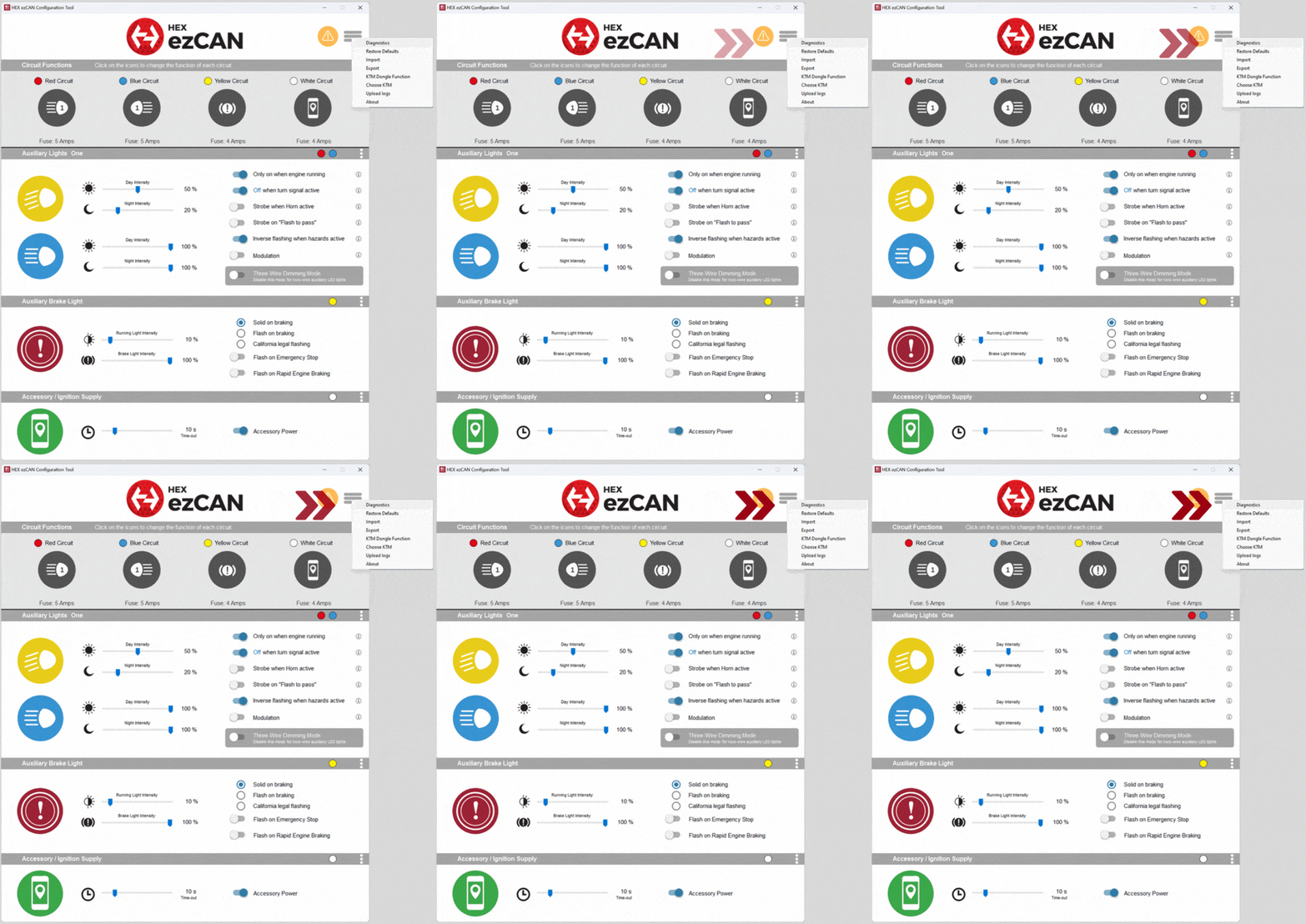
  4. Click the hamburger icon in the upper right corner of the HEX ezCAN Configuration Tool, then click Diagnostics (below, left).
    • The Diagnostics window will be shown (below, right).

5. Read the Horn Input Voltage value (below, right). If the HEX ezCAN horn trigger circuit is working correctly, the value should be at or near 0V when the horn is inactive, and approximately 12V when the horn is active.

Step 6:

HEX UP-DOWN Switch for auxiliary front light control

If a discontinued HEX ezCAN II for KTM is installed on any ezCAN-compatible KTM model other than a 2021-onward 1290, the brightness of the bike’s auxiliary front lights can be adjusted with the HEX ezCAN configuration software, or with the optional HEX UP-DOWN Switch. 

Note that on all KTM 1290 models manufactured from 2021 onward, the brightness of auxiliary front lights can be adjusted using the bike’s left-side handlebar controls. The HEX UP-DOWN Switch cannot be used on these models.

IMPORTANT :

  • This step is optional.
  • The HEX UP-DOWN Switch is only compatible with the discontinued HEX ezCAN II for KTM. The HEX UP-DOWN Switch is not compatible with the HEX ezCAN Gobi for KTM, or with any other HEX ezCAN.
 
If you have purchased an optional HEX UP-DOWN Switch, install the switch by doing the steps that follow:
  1. Install the switch on your bike’s handlebar using the hardware provided in the switch installation kit (upper image, right).
  2. Route the white female JWPF connector on the HEX UP-DOWN Switch to the main body of the HEX ezCAN along an existing handlebar wiring run.
  3. Connect the white female JWPF connector on the switch to the white male JWPF connector on the HEX ezCAN II for KTM.

Step 7:

Connectez les accessoires en utilisant le code couleur.

Le kit d'installation HEX ezCAN comprend quatre connecteurs à deux fils avec bornes de connexion mâles, des fils d'alimentation orange et des fils de terre noirs.

Les pièces suivantes sont également incluses :

  • 4 fils de borne à modulation de largeur d'impulsion (PWM) (orange avec traceur blanc)
  • 4 joints d'étanchéité en caoutchouc

Connecting 3-wire accessories:
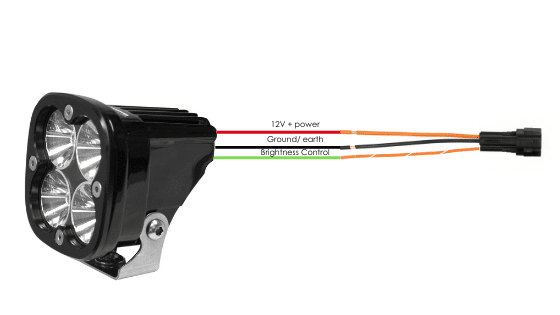
If the accessory to be connected to a power circuit has three wires, convert a two-wire stub connector to a three-wire connector as shown in the Connecting 3-wire LED lights section of the HEX ezCAN User Manual (downloadable from here).

Connecting 2-wire accessories:
If the accessory to be connected to a power circuit has two wires, seal the stub connector’s empty terminal cavity as shown in the Connecting 2-wire accessories section of the HEX ezCAN User Manual.

Unused power circuits:
If any of the HEX ezCAN’s power circuits will not be used, we recommend that you connect a blanking plug to the output plug of each unused circuit.

Applications à 2 fils : insérez un joint d'obturation.
Applications à 3 fils : insérez un fil de borne PWM.

4 fils terminaux et joints d'obturation
4 connecteurs à 2 fils

Connect the male terminal of each stub connector to the relevant female HEX ezCAN power circuit connector (right).

Connexion d'un accessoire à 2 fils à un connecteur stub HEX ezCAN :

  1. Connectez le fil de terre de l'accessoire (généralement noir ou marron, mais pas toujours) au fil de terre d'un connecteur HEX ezCAN.
  2. Connectez le câble d'alimentation de l'accessoire (généralement rouge, mais pas toujours) au câble d'alimentation 12 V d'un connecteur HEX ezCAN stub.


Connexion d'un accessoire à 3 fils à un connecteur stub HEX ezCAN :

  1. Connectez le fil de terre et le fil d'alimentation de l'accessoire comme décrit ci-dessus.
  2. Connectez le fil de commande PWM de l'accessoire au fil bicolore (couleur unie + traceur) d'un connecteur stub HEX ezCAN.


Connexion d'accessoires intelligents à faible consommation à un circuit d'alimentation :

Si vous installez des accessoires « intelligents » (c'est-à-dire des accessoires à faible consommation d'énergie capables d'entrées et de commandes intelligentes via le bus LIN du HEX ezCAN), veuillez noter les points suivants :

  1. Smart accessories (including the HEX ezSWITCH) must only be connected to the HEX ezCAN’s ezBUS (white) power circuit. Smart accessories will not work properly if connected to the red, yellow or blue circuits.
  2. Le circuit d'alimentation ezBUS (blanc) peut accueillir un nombre illimité d'accessoires individuels, jusqu'à un maximum de quinze.
  3. A selection of HEX ezBUS adaptors and connectors is available, allowing you to connect smart accessories quickly and easily. See the ezBUS Accessories section of the HEX Innovate online store for details.

Read the HEX ezBUS and Configuring HEX ezBUS functionality sections of the HEX ezCAN user manual (downloadable from here) for detailed information on how to use ezBUS functionality.

Notez que si le circuit blanc est réglé en mode ezBUS , sa limite de déclenchement du fusible est réglée par défaut à 15 ampères. Si nécessaire, la fonctionnalité ezBUS PWR peut être utilisée pour augmenter la capacité de courant du circuit blanc jusqu'à un maximum de 30 ampères en mode ezBUS. Pour plus de détails, consultez la section correspondante du manuel d'utilisation HEX ezCAN.

IMPORTANT: If the stub connectors included in your HEX ezCAN installation kit do not have orange power wires, but instead have colours that match the colouring of the ezCAN power circuits (as seen above), always connect like-to-like (red stub connector to red power circuit, blue stub connector to blue power circuit, and so on.)

INSTALLATION PLUS FACILE AVEC LE KIT D'EXTENSION HEX ezCAN

Le kit d'extension HEX ezCAN contient tout ce dont vous avez besoin pour connecter des feux auxiliaires avant, des feux accessoires arrière et un klaxon au HEX ezCAN. Il comprend également des connecteurs supplémentaires qui vous permettent de connecter d'autres accessoires.

Vous pouvez acheter le kit de câbles d'extension ici.

Kit d'extension HEX ezCAN

  • 2 câbles d'extension à 3 conducteurs de 1,5 m (généralement utilisés pour les feux auxiliaires avant à 2 ou 3 fils)
  • 1 câble d'extension à 3 conducteurs de 0,5 m (généralement utilisé pour un feu arrière/feu stop)
  • 1 câble d'extension à 2 conducteurs de 1,5 m, avec connecteurs à fourche (généralement utilisé pour connecter des avertisseurs sonores ou d'autres accessoires à 2 fils)
  • 3 connecteurs MT-3 femelles, avec broches et joints de borne
  • Kit de 5 connecteurs MT-3 mâles, comprenant des broches de connexion et des joints d'étanchéité
  • 5 joints d'étanchéité en caoutchouc (utilisés dans les cas où seuls deux bornes sont utilisées dans un connecteur MT-3 à 3 fils)
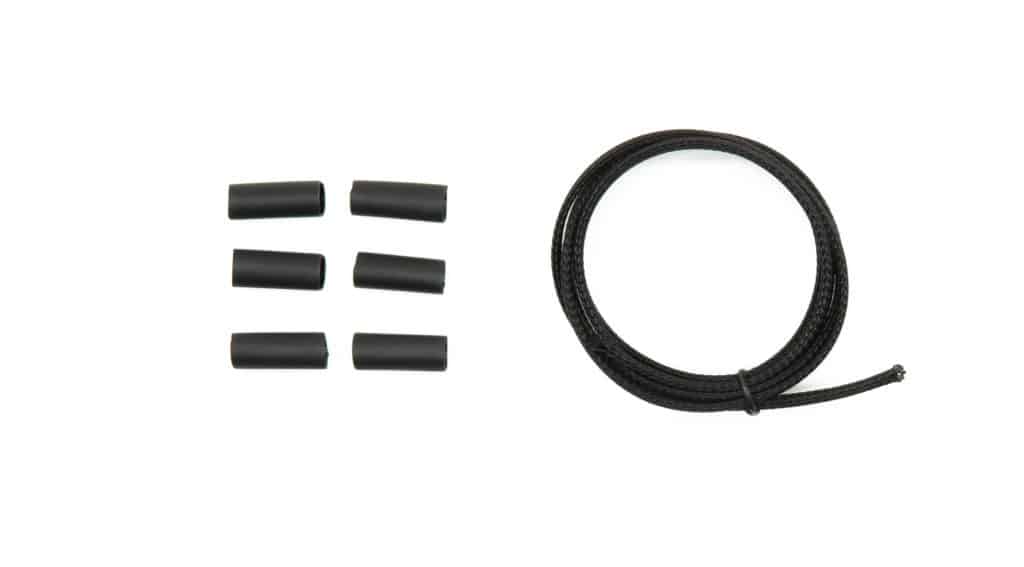
  • 6 sections de 20 mm de gaine thermorétractable avec revêtement adhésif
  • 2 bornes femelles à fiche plate de 6,3 mm
  • Gaine de câble de 1 m
Extensions des feux auxiliaires avant
Rallonge de corne
Gaine thermorétractable avec revêtement adhésif et gaine de 1 m
Rallonge pour frein/accessoire

Step 8:

Testez l'installation

AVERTISSEMENT : Testez et vérifiez vos installations et accessoires dans un environnement sûr et contrôlé avant la première utilisation. La prudence est de mise à tout moment. Une vigilance accrue est nécessaire lors du test de nouvelles fonctionnalités ou de nouveaux accessoires. Vous le faites à vos propres risques.

AVERTISSEMENT : HEX Innovate n'est pas responsable des blessures ou dommages, quelle qu'en soit la cause, et tous les produits et services sont utilisés à vos propres risques.

Avant de finaliser l'installation du HEX ezCAN ou de réinstaller les composants que vous avez retirés, il est important de tester tous les accessoires nouvellement installés afin de vérifier leur bon montage et leur bon fonctionnement.

De nombreux accessoires alimentés par HEX ezCAN peuvent être testés en mettant le contact et en actionnant les commandes correspondantes. Les exceptions sont les suivantes :

  • Accessoires pour lesquels vous avez activé la fonction« Uniquement lorsque le moteur tourne »(par exemple, les feux auxiliaires 1, les feux auxiliaires 2, les MotoLights et les vêtements chauffants). Pour tester ces fonctions, le moteur de la moto doit être en marche.
  • Certaines fonctions des feux de freinage nécessitent que la moto roule à une vitesse minimale donnée. Par exemple, les fonctions« Flash on Emergency Stop» (clignotement en cas d'arrêt d'urgence) et« Flash on Rapid Engine Braking » (clignotement en cas defreinage moteur rapide) nécessitent une décélération supérieure à 21 kilomètres par heure par seconde.

Step 9:

Terminer l'installation

Terminez l'installation de HEX ezCAN comme suit :

  1. Assurez-vous que le corps principal du HEX ezCAN est bien fixé dans un endroit où il est protégé de la pression, de la chaleur et des chocs.
  2. Make sure all factory, HEX ezCAN and accessory cables and wiring harnesses are well clear of all moving parts, and securely fastened. Where needed, use the cable ties included in the ezCAN installation kit.
  3. Remplacez tous les composants et fixations de la moto qui ont pu être retirés pour faciliter l'installation du HEX ezCAN.
  4. Inspectez l'ensemble de l'installation pour détecter les erreurs ou les problèmes, et corrigez tous les problèmes que vous avez relevés.
  5. Testez une deuxième fois tous les nouveaux accessoires pour vérifier leur bon fonctionnement.
  6. Si vous ne l'avez pas encore fait,téléchargez le manuel d'utilisation HEX ezCAN à partir de cette page.
  7. Conservez le manuel dans un endroit sûr sur votre ordinateur, tablette ou téléphone : il contient toutes les informations dont vous avez besoin pour utiliser le HEX ezCAN et régler ses fonctionnalités.

Attention !

Vous allez maintenant être redirigé vers notre site Web principal pour consulter notre politique de confidentialité.

Attention !

Vous allez maintenant être redirigé vers notre site Web principal pour consulter nos informations légales.

Attention !

Vous allez maintenant être redirigé vers notre site Web principal pour consulter nos informations légales.